Participant
December 3, 2024
Answered

Dateien aus der Adobe Cloud auf Festplatte Exportieren

  • December 3, 2024
  • 1 reply
  • 615 views

Wie kann ich ganz einfach einen Ordner aus der Adobe Cloud auf meine Festplatte übertragen?

Ich habe was über eine Synchronisationfunktion gehört, die aber anscheinend nicht mehr vorhanden ist.

Zudem gibt es die Möglichkeit, immer zehn Dateien auf einmal zu exportieren. Da ist mir aber aufgefallen, dass manche Dateien null KB haben, wenn man sie exportiert und manche Dateien gar nicht erst heruntergeladen werden. Zudem ist mir das zu viel Arbeit.


Zusammengefasst:

Ich will den Ordner, den ich in der Adobe Cloud habe, eins zu eins so auf meiner Festplatte haben.

 Ist das irgendwie möglich?

Correct answer Imaginerie

First of all, I will move your question to the relevant forum as it's not a Photoshop question:
Secondly, see my answer below:

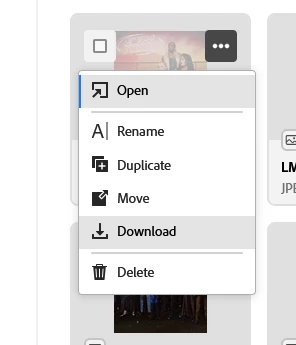
As far as I know, you cannot dowload a whole folder from the Files webpage, you can however dowload individual files, from the 3 dots menu on each image


The sync option has been discontinued for a good year now (maybe even longer) and it made me quite sad as I used it often.


You can use the "translate" option in the post to translate my answer


1 reply

Imaginerie
Community Expert
ImaginerieCommunity ExpertCorrect answer
Community Expert
January 16, 2025

First of all, I will move your question to the relevant forum as it's not a Photoshop question:
Secondly, see my answer below:

As far as I know, you cannot dowload a whole folder from the Files webpage, you can however dowload individual files, from the 3 dots menu on each image


The sync option has been discontinued for a good year now (maybe even longer) and it made me quite sad as I used it often.


You can use the "translate" option in the post to translate my answer