


Jan 18, 2026 8:39 PM UTC
Question

Erreur 192 malgré la réinstallation

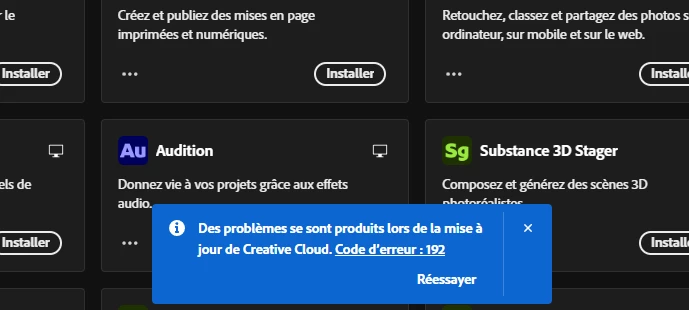
Depuis quelques jours, mon Creative Cloud ne cesse de me répété qu'il y a une erreur ("Code d'erreur : 192") Et je ne sais plus quoi faire, j'ai tenté énormément de choses :

- Redémarrer l'ordinateur
- Supprimer des fichiers caches/Temporaires
- Déconnecté / Reconnecter
- Désinstaller / Réinstaller
- Installer via le site

Après avoir acheté Premiere Pro, j'ai peur de ne jamais trouver une solution et donc de payer dans le vide.
Je ne sais plus quoi faire, aidez-moi svp.

Version installée : 6.8.0.821
PC - Windows 11 version 10.0.26200 Build 26200


15 replies

kglad
Community Expert
Community Expert
Jan 18, 2026 10:29 PM UTC

no error: download the left-most cc installer.

Translate
Jan 18, 2026 10:35 PM UTC

Donc j'ai téléchargé le dernier, et j'ai encore le soucis... devrais-je annuler l'abonnement de mon premier pro et créer un nouveau compte adobe ? 


Translate
kglad
Community Expert
Community Expert
Jan 18, 2026 11:06 PM UTC

did you run the cleaner?

did you restart your computer?

and then download the correct installer?

Translate
Jan 18, 2026 10:23 PM UTC

Je pourrais aller a cette page mais sachant que je suis sur Windows 11, cela ne va pas générer d'erreurs ? 

Translate
kglad
Community Expert
Community Expert
Jan 18, 2026 10:16 PM UTC

are you seeing 


875238i6A29BC4E8078C490.png


Translate
Jan 18, 2026 10:11 PM UTC

J'ai essayé sur Edge et comme sur Google, le fichier ne s'affiche pas sur la page de téléchargement, même en cliquant sur "recommencer le téléchargement" cela ne fait rien,  devrais-je essayer sur un autre moteur de recherche ?


Translate
kglad
Community Expert
Community Expert
Jan 18, 2026 9:53 PM UTC

use a different browser 

Translate
Jan 18, 2026 9:49 PM UTC

J'ai été jusqu'a l'étape "reinstall the cc desktop app using the "alternative download links" at the bottom of the page at https://helpx.adobe.com/download-install/kb/creative-cloud-desktop-app-download.html" où j'essaie d'appuyer le bouton "télécharger" cela ne m'installe rien, aucun téléchargement en cours, malgré le fait que j'ai redirigé tous mes téléchargement 

Est-ce normal ?


Translate
kglad
Community Expert
Community Expert
Jan 18, 2026 8:55 PM UTC

do a clean cc install carefully following each applicable step:

uninstall every cc app including preferences per https://helpx.adobe.com/creative-cloud/help/uninstall-remove-app.html

then uninstall the cc desktop app, again using the correct uninstaller per https://helpx.adobe.com/creative-cloud/help/uninstall-creative-cloud-desktop-app.html#sa_src=web-messaging

clean your computer of cc files per http://www.adobe.com/support/contact/cscleanertool.html

check for, and if available, update your os

if windows is your os, repair all ms visual c++ versions that can be repaired (use google if you don't know how to do this)

if windows is your os update your ms visual c++, if it can be updated (use google if you don't know how to do this)

restart your computer (don't skip this)

reinstall the cc desktop app using the "alternative download links" at the bottom of the page at https://helpx.adobe.com/download-install/kb/creative-cloud-desktop-app-download.html

use the desktop app to install your cc programs/trials>

if that fails, you probably have a corrupt user account. google your os and how to create a new one.

Translate
Jan 18, 2026 8:46 PM UTC

J'ai déjà été voir cette page et elle explique le problème pour les application d'adobe, sauf que mon problème concerne l'application de bureau Creative Cloud et non une application.

Translate
kglad
Community Expert
Community Expert
Jan 18, 2026 8:43 PM UTC