

melbendi
Inspiring
February 20, 2024
Answered

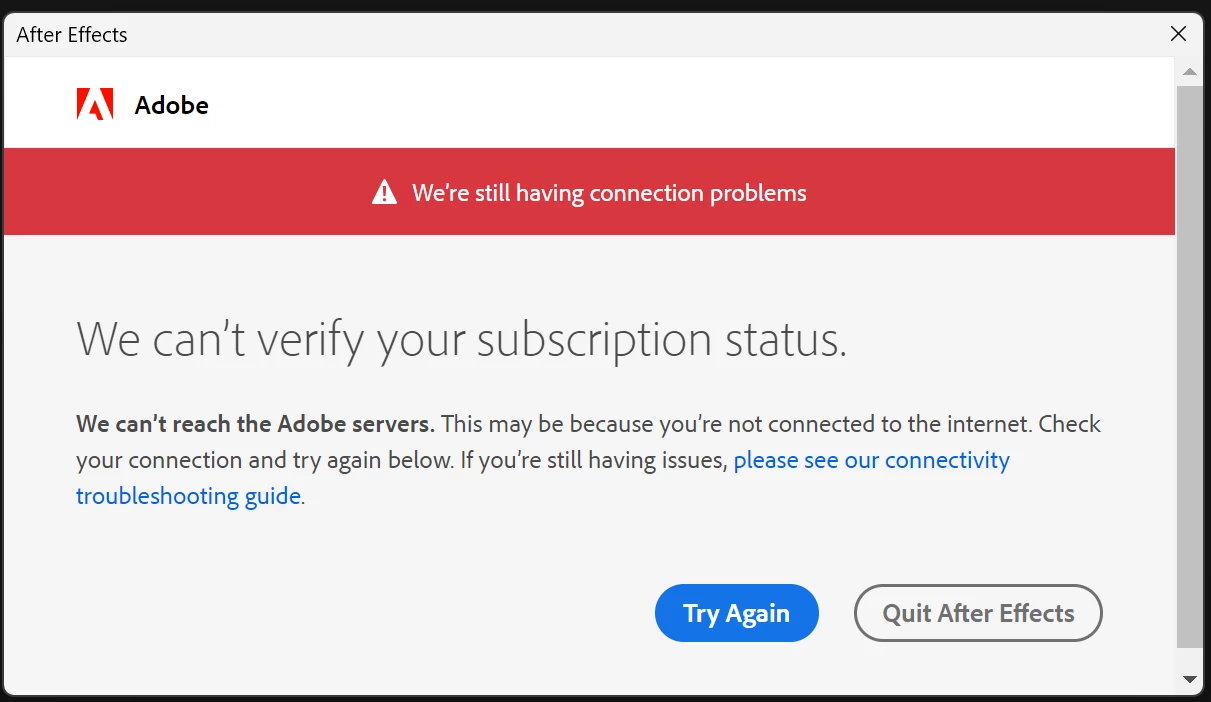
Error: Can't verify subscription

  • February 20, 2024
  • 1 reply
  • 1136 views

Could anyone please help me solve this error?  I'm on Windows 11 23H2 Build 22631.3155, and there's nothing wrong with my internet connection.  When I try to open an Adobe app, I get this error.  Thank you!

This topic has been closed for replies.
Correct answer kglad

confirm that you can connect to the secure adobe servers by reading, http://helpx.adobe.com/x-productkb/policy-pricing/activation-network-issues.html


do you see both logos after clicking "link"?


if you can and still see a connection error try these steps, https://helpx.adobe.com/download-install/kb/common-network-connectivity-issues.html


if those all fail, white list the adobe network endpoints, https://helpx.adobe.com/enterprise/kb/network-endpoints.html


or, if you’re trying to activate a perpetual license, you can try offline activation by disconnecting your computer from the internet, starting activation and using https://aoes-stage.licensingstack.com/aoes/aoes/v1/imsauthstatus


1 reply

kglad
Community Expert
kgladCommunity ExpertCorrect answer
Community Expert
February 20, 2024

confirm that you can connect to the secure adobe servers by reading, http://helpx.adobe.com/x-productkb/policy-pricing/activation-network-issues.html


do you see both logos after clicking "link"?


if you can and still see a connection error try these steps, https://helpx.adobe.com/download-install/kb/common-network-connectivity-issues.html


if those all fail, white list the adobe network endpoints, https://helpx.adobe.com/enterprise/kb/network-endpoints.html


or, if you’re trying to activate a perpetual license, you can try offline activation by disconnecting your computer from the internet, starting activation and using https://aoes-stage.licensingstack.com/aoes/aoes/v1/imsauthstatus


melbendi
melbendiAuthor
Inspiring
February 20, 2024

Thanks, kglad, I'm running down your list.  I don't see both logos, only this one. 

Previously, I tried the instructions involving the Web Credentials, and there are none. Just mentioning in case that's a clue (image below).  I'm still trying your list of solutions...

kglad
Community Expert
Community Expert
February 20, 2024

reset your hosts file or clear adobe references from it
