

harryl66
Participant
August 19, 2018
Answered

Error - Windows can't find Adobe Installer.exe

  • August 19, 2018
  • 4 replies
  • 19107 views

I am trying to do updates on Creative Cloud. I get a message:
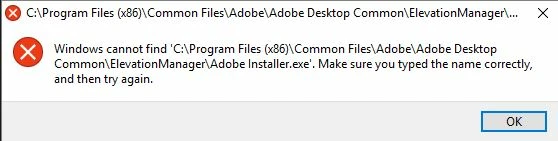
Please help - very frustrating

Thanks

Harry

Correct answer kglad

uninstall everything cc including preferences, https://helpx.adobe.com/creative-cloud/help/uninstall-remove-app.html

then uninstall the cc desktop app, https://helpx.adobe.com/creative-cloud/help/uninstall-creative-cloud-desktop-app.html

clean your computer of cc files per http://www.adobe.com/support/contact/cscleanertool.html

restart your computer (don't skip this)

reinstall the cc desktop app, https://creative.adobe.com/products/creative-cloud.

if you're unable to install the cc desktop app at this stage, use an administrator account (solution 4 here, https://helpx.adobe.com/creative-cloud/kb/creative-cloud-missing-damaged.html)

use the desktop app to install your cc programs/trials

4 replies

Participant
September 7, 2023

Simpler solution that works for Windows at least.


  • From Start menu go to Settings.
  • Go to "Apps".
  • Find Adobe Creative Cloud from the list.
  • Select Uninstall.
  • It will ask if you want to "Uninstall" or "Repair".
  • Click on "Repair".


It will reinstall Creative cloud and updates should install correctly again.

Participant
August 16, 2023

Just go to Control Panel and choose Repair on Creative Cloud...Simple

Participating Frequently
August 17, 2023

I had to download the installer to get mine to work. Repair is definitely the easiest/ best option though. The 'correct' answer on here (above) is more general and wll take longer.

C0FF33_ZA
Participating Frequently
September 9, 2021

I encountered this same issue and resolved it by reinstalling the CC app over itself, which restored the missing EXE.

kglad
Community Expert
Community Expert
September 9, 2021

nice to hear, but that won't solve many others problems because new installs won't overwrite previous options/settings.

C0FF33_ZA
Participating Frequently
September 9, 2021

My resolution was purely for this issue.
It solved the problem and I didn't have to reinstall any apps.

kglad
Community Expert
kgladCommunity ExpertCorrect answer
Community Expert
August 19, 2018

uninstall everything cc including preferences, https://helpx.adobe.com/creative-cloud/help/uninstall-remove-app.html

then uninstall the cc desktop app, https://helpx.adobe.com/creative-cloud/help/uninstall-creative-cloud-desktop-app.html

clean your computer of cc files per http://www.adobe.com/support/contact/cscleanertool.html

restart your computer (don't skip this)

reinstall the cc desktop app, https://creative.adobe.com/products/creative-cloud.

if you're unable to install the cc desktop app at this stage, use an administrator account (solution 4 here, https://helpx.adobe.com/creative-cloud/kb/creative-cloud-missing-damaged.html)

use the desktop app to install your cc programs/trials

사쿠라
Inspiring
June 6, 2023

we don't want uninstall everything. It's waste a lot of time. just download the installer.exe file. where find it ?

kglad
Community Expert
Community Expert
June 6, 2023

you can skip to the last step, if you had/have no problems:


uninstall every cc app including preferences per https://helpx.adobe.com/creative-cloud/help/uninstall-remove-app.html

then uninstall the cc desktop app, again using the correct uninstaller per https://helpx.adobe.com/creative-cloud/help/uninstall-creative-cloud-desktop-app.html#sa_src=web-messaging

clean your computer of cc files per http://www.adobe.com/support/contact/cscleanertool.html

check for, and if available, update your os

if windows is your os, repair all ms visual c++ versions that can be repaired (use google if you don't know how to do this)

if windows is your os update your ms visual c++, if it can be updated (use google if you don't know how to do this)

restart your computer (don't skip this)

reinstall the cc desktop app using the "alternative download links" at the bottom of the page at https://helpx.adobe.com/download-install/kb/creative-cloud-desktop-app-download.html

use the desktop app to install your cc programs/trials

NOTE: win 11 users that have trouble with the latest win 10 installer often have success with the older win 10 installer.
