



Spokesman4
Participant
April 4, 2024
Question

How can I delete outdated Adobe apps?

  • April 4, 2024
  • 2 replies
  • 5084 views

As a longtime Adobe user, my Mac OS has accrued a lot of Adobe apps I no longer use or older versions of ones I still use. How do I delete these?


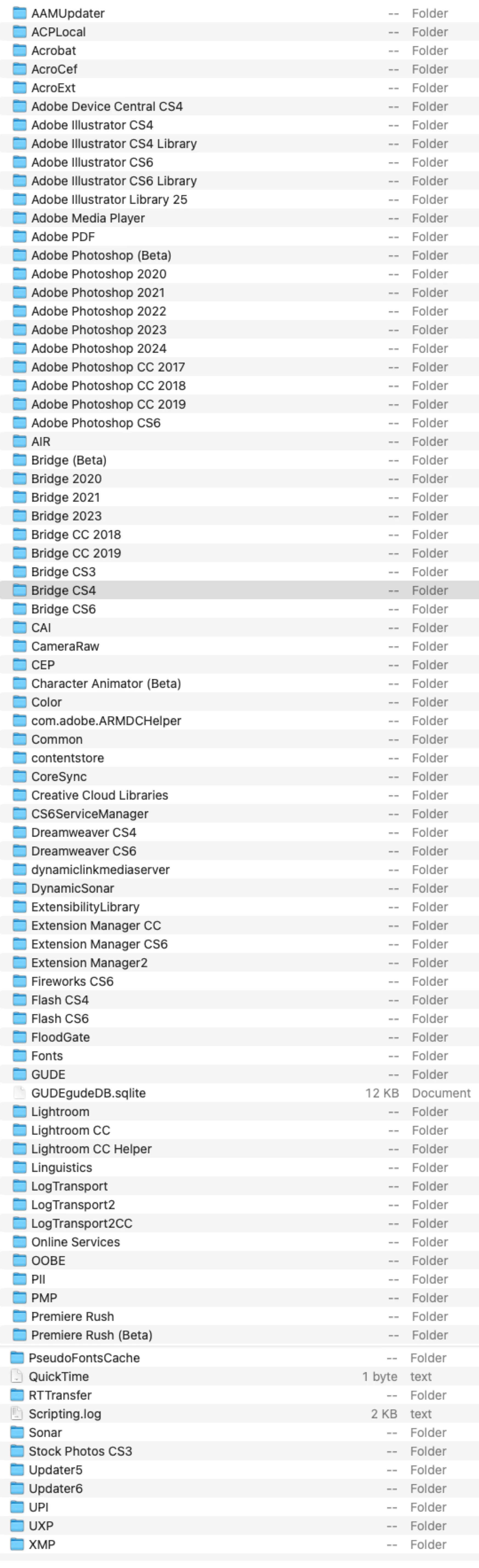
For example, in my Mac OS Sonoma library (/Library/Application Support/Adobe/), I have Photoshop CS6 from the old disc days through through the CC years up to Photoshop 2024 in addition to Beta. Which ones can I safely delete without impairing the 2024 and Beta versions? The same is true of Bridge and Lightroom. I also have Dreamweaver and Illustrator to which I no longer subscribe, but which I wish to delete.


I have attached a screenshot of the Adobe folder on my computer containing these apps and would appreciate any advice.
 

This topic has been closed for replies.

2 replies

Participant
April 13, 2024

I've run into the same issue and see inside the old Application Folders, the Uninstall App will not run with my current operating system.

To remove these old apps, is it as simple as just moving these Application Folders to the Trash and hitting Delete? I believe this will leave some items in the Library Folders – is there a method to remove these? Thanks.

kglad
Community Expert
Community Expert
April 13, 2024

use your os uninstaller if the cc app doesn't work.

Participant
April 15, 2024

What's the link to this? I'm on an M1 MacBook Pro. Do I use the CC Cleaner? BTW, I'm trying to get ride of CC 2015 Apps (like InDesign CC 2015). Thanks again.

https://helpx.adobe.com/creative-cloud/kb/cc-cleaner-tool-installation-problems.html

kglad
Community Expert
Community Expert
April 4, 2024

all versions are independent of each other.  uninstall those you do not use.