

Participant
September 5, 2022
Answered

How do I remove every last trace of Adobe CC?

  • September 5, 2022
  • 1 reply
  • 1337 views

I've uninstalled Creative Cloud and all apps. But I still have Core Syc running and a bunch of files in applications/utilities:
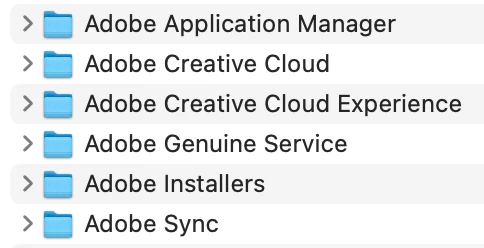
How do I remove every last trace of clutter?


Thanks🙏

This topic has been closed for replies.
Correct answer Tarun Saini

Thanks for your response. Have you tried using the Creative Cloud Cleaner tool to check if that makes any difference? If not, then here is the link: https://helpx.adobe.com/in/creative-cloud/kb/cc-cleaner-tool-installation-problems.html


1 reply

Tarun Saini
Community Manager
Community Manager
September 5, 2022

Hi @supersimpleguy,


Thanks for reaching out. Would you mind checking this article which provides information about some of the background processes and why they are important? Here is the link: https://helpx.adobe.com/in/x-productkb/global/adobe-background-processes.html


Also, if you don't use the file sync, you can pause it from the Creative Cloud Desktop application by opening the app clicking on the profile icon and then clicking on preferences > syncing.


Please ensure you're using the latest version of the Creative Cloud Desktop application. If you're experiencing performance-related issues due to Adobe background processes, make sure you're operating system meets the system requirement of Creative Cloud, which you can check from here: https://helpx.adobe.com/creative-cloud/help/creative-cloud-desktop-app-system-requirements.html


Let us know if that helps.


Regards,

Tarun


Participant
September 5, 2022

Hi, I don't use any Adobe programmes now, so I just want to remove all trace and don't want any background processses running.

Tarun Saini
Community Manager
Tarun SainiCommunity ManagerCorrect answer
Community Manager
September 5, 2022

Thanks for your response. Have you tried using the Creative Cloud Cleaner tool to check if that makes any difference? If not, then here is the link: https://helpx.adobe.com/in/creative-cloud/kb/cc-cleaner-tool-installation-problems.html
