Participant
Oct 6, 2026 4:34 PM UTC
Answered

I hadn't opened my Creative Cloud Pro for 10 days. Today I noticed that none of the applications in my plan would open; all have a "download" label.  It’s as if I had never worked with them. My subscription is valid. What could have happened?

Help me.

    kglad
    kgladCorrect answer
    Community Expert
    Oct 7, 2026 12:35 PM UTC

    check your account, https://account.adobe.com and verify everything is what you expect.


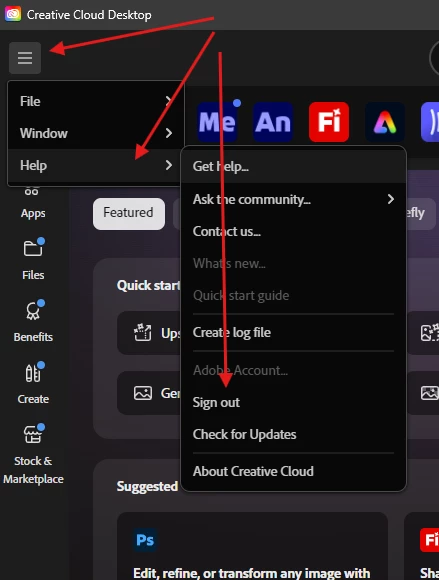
    then sign out of the cc desktop app


    then exit the cc desktop app and reopen it.  sign in with the same adobe id/pass used to confirm your subscription.

    2 replies

    kglad
    Community Expert
    kgladCommunity ExpertCorrect answer
    Community Expert
    Oct 7, 2026 12:35 PM UTC

    check your account, https://account.adobe.com and verify everything is what you expect.


    then sign out of the cc desktop app


    then exit the cc desktop app and reopen it.  sign in with the same adobe id/pass used to confirm your subscription.

    Translate
    Peru Bob
    Community Expert
    Community Expert
    Oct 7, 2026 12:20 AM UTC

    Try resetting the CC App.

    To reset the Creative Cloud desktop app, make sure it's in the foreground, then press:

    Win: Ctrl + Alt + R

    Mac: Cmd + Opt + R

    If that doesn't work, try uninstalling and reinstalling the CC App:

    https://helpx.adobe.com/creative-cloud/apps/manage-apps/creative-cloud-desktop-app/uninstall-creative-cloud-desktop-app.html

    Translate