



Node.exe - Are you serious?
I was really confused about my CPU fans working all the time even when the system is ideling, with no apps running (Win 11)
I checked the taskmanager and there is a task running with the name of “node.exe”. if I close that task, the peaks of my CPU immediately come down and the system gets quiet… until some seconds later the task is started again and leads to performance peaks in the first 4 Cores of the CPU.
The node.exe is located in this folder: C:\Program Files\Adobe\Adobe Creative Cloud Experience\libs
I just moved it to somewhere else, so it couldn’t restart and voilá, when I kill the task once again, the system stays quiet.
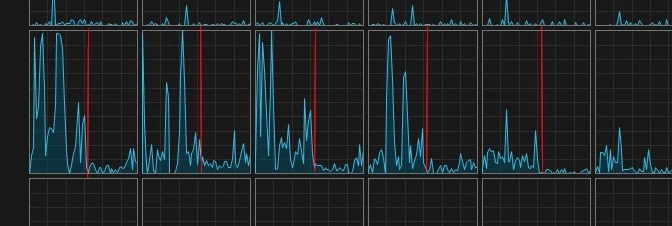
Guys, I have this with my home machine, and the PC at work. If this is common for all CC users, it’s a severe waste of energy and maybe CPU lifetime.
If the Creative Cloud App is running, there is another node.exe running, located here:
C:\Program Files\Common Files\Adobe\Creative Cloud Libraries\libs
But that is not as performance costly as the one in the Experience-folder. At least it doesn’t generate those peaks.
Adobe, Please fix that!
best
Michael
 AdChoices