


Inspiring
September 19, 2023
Question

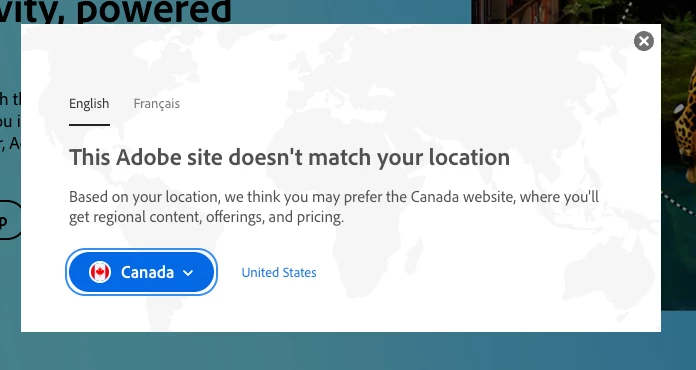
Please Disable "This Adobe site doesn't match your location" on helpx pages

  • September 19, 2023
  • 19 replies
  • 7437 views

When I need to access an Adobe learning resource on their helpx site I must contend with a pop-up just about every time. For a random example I chose this page: https://helpx.adobe.com/photoshop/using/adjusting-image-sharpness-blur.html. The pop up tells me I'd prefer to use Canada as my location (I am in Canada), but why would I? I already own a licence, so I don't care about pricing. I very much doubt that there is "regional content" that I would care about since Photoshop is the same app, with the same tools, whether I'm in British Colombia, California or Mali. I'm looking for support with a specific tool that I've already purchased—I'm not in need of a sales pitch.


I'm regularly refering to these helpx sites for questions about several Adobe products (I just picked the Photoshop forum, because there doesn't appear to be a general one). I typically use Google to find the resource (it's just an old habit, but it shouldn't matter how I find the content…) I then have to click the little x before I can view the resource I've requested. This happens multiple times a day sometimes. Can Adobe please stop showing this message on support pages that are meant to help users learn use tools in apps that they've presumably already paid for?
 

19 replies

Participating Frequently
May 9, 2024

A good intention turned incredibly obnoxious. I also suffer from this constant annoyance, as if remembering cookies every time wasn't bad enough (apparently that doesn't work properly either), I have two obnoxious bars that I have to click through. Nobody at Adobe cares, that's evident.

NormanStormin
Known Participant
January 28, 2024

Literally does not work to fix any URL that takes us to the Adobe site. Specifically when clicking on a link in, say, Creative Cloud Desktop application that sends us to a help page. The page is inevitably a general Adobe page, not for my region of NZ. Which as the poster says is fine. I am looking for help with a product that is the same across all regions. I do NOT need to be in my home region. I also don't mind if it remaps the help URL to have my home region in it automatically eg "/nz/". But having to click on a dialog box EVERY SINGLE TIME is annoying and a waste of time. 


I appreciate that Adobe has us captured by their subscription model, but this does not make me any more happy with Adobe. It just reminds me every time that Adobe needs to pay more attention to the little details that we encounter all the time.

Participating Frequently
December 7, 2023

Excellent, spot on Post.

Participating Frequently
December 7, 2023

An Excellent sadly Adobe support/ corporate fail to recognise and do something about...

Participant
October 25, 2023

Hilarious. That popup was driving me crazy, as I'm Chilean but I want content in English, not only because sometimes translations are faulty, or worse, autotranslated using AI; but some tutorials are region-locked, and redirect to Adobe's main page.


Please disable this annoying "feature".

Participating Frequently
October 12, 2023

Cannot select "remember this choice".... does not (removed) work.

Known Participant
September 27, 2023

Hilarious, I choose "Canada" but the "Remember this choice" button won't click! What is wrong with this company?!

Are__KayAuthor
Inspiring
September 19, 2023

I have used the Choose your region page before, and I will try it again (thanks for the URL, I could never find it after I found it the last time). But I believe this is a browser specific, cookie-based solution, because it stopped working for me after a while. I am a web developer—I clear my cache daily and use different browsers and OSes on the regular, so I can't rely on cookie based preferences.


But even if the tool Kevin recommends worked perfectly at an account level (which it doesn't) the ability to change my region manually doesn't alter my request. I simply don't agree that it matters what region I'm in to begin with. Help content, as long as it's in my chosen language, should not be marked as regionally specific content. It should be made to be accessible, efficient and as detailed as possible for the busy people who seek it, regardless of the country they are in.

Kevin Stohlmeyer
Community Expert
Community Expert
September 19, 2023

Hi @Are__Kay go to https://www.adobe.com/international/selector/ and choose your region then click "remember this choice"


Participant
May 14, 2025

Doesn't work for me. Can select my location (Australia) but neither the Remember nor even the Select buttons are operative!