


Participant
March 26, 2025
Answered

Problem with Plugins Tab in Adobe Creative Cloud Desktop App

  • March 26, 2025
  • 2 replies
  • 1048 views

Hello,

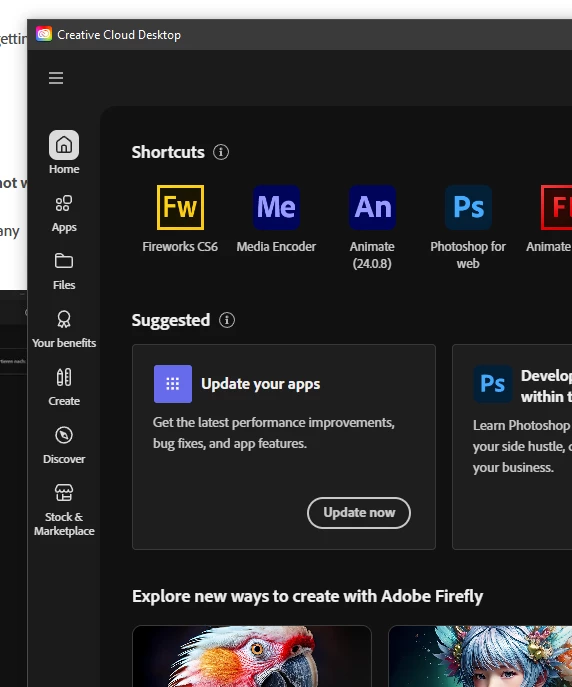
I am facing an issue with the Plugins tab in my Adobe Creative Cloud Desktop App. The tab is not loading, and I keep getting an error message.

Here are the steps I have already taken to resolve the issue:

  • I reinstalled the Creative Cloud app.

  • Cleared all the cache.

  • Deleted the OOBE folder.

  • Added a ServiceConfig.xml file with en_US settings (this was done because the Plugins tab sometimes does not work correctly in the German language setting of Adobe Creative Cloud).

Despite these actions, the problem persists. Can anyone guide me on how to fix this issue? I would greatly appreciate any suggestions or steps that can help resolve the issue.

Thank you in advance!

Correct answer David__B

students can have plans managed by their schools or managed by themselsves.  make sure you are the administrator your own plan:


https://helpx.adobe.com/enterprise/kb/contact-administrator.html


and, if you are, why is your desktop app lacking so many tabs/features?


https://helpx.adobe.com/enterprise/kb/contact-administrator.html


Hi @delbrim_2471

In addition to kglad's suggestions you may also want to check if the issue is firewall related. Please try temporarily disabling your firewall or any other active security software. See this thread for more info https://adobe.ly/44QJXga

Best,

Dave

2 replies

Participant
March 26, 2025

Hello,

I am facing an issue with the Plugins tab in my Adobe Creative Cloud Desktop App. The tab is not loading, and I keep getting an error message.

Here are the steps I have already taken to resolve the issue:

  • I reinstalled the Creative Cloud app.

  • Cleared all the cache.

  • Deleted the OOBE folder.

  • Added a ServiceConfig.xml file with en_US settings (this was done because the Plugins tab sometimes does not work correctly in the German language setting of Adobe Creative Cloud).

Despite these actions, the problem persists. Can anyone guide me on how to fix this issue? I would greatly appreciate any suggestions or steps that can help resolve the issue.

Thank you in advance!
kglad
Community Expert
Community Expert
March 26, 2025

change your default browser to an updated non-opera browser 

Ged_Traynor
Community Expert
Community Expert
March 26, 2025

@delbrim_2471 you'd be better off reporting the issue on the Creative Cloud Desktop forum