

Mr_rossduncan
Inspiring
March 13, 2025
Answered

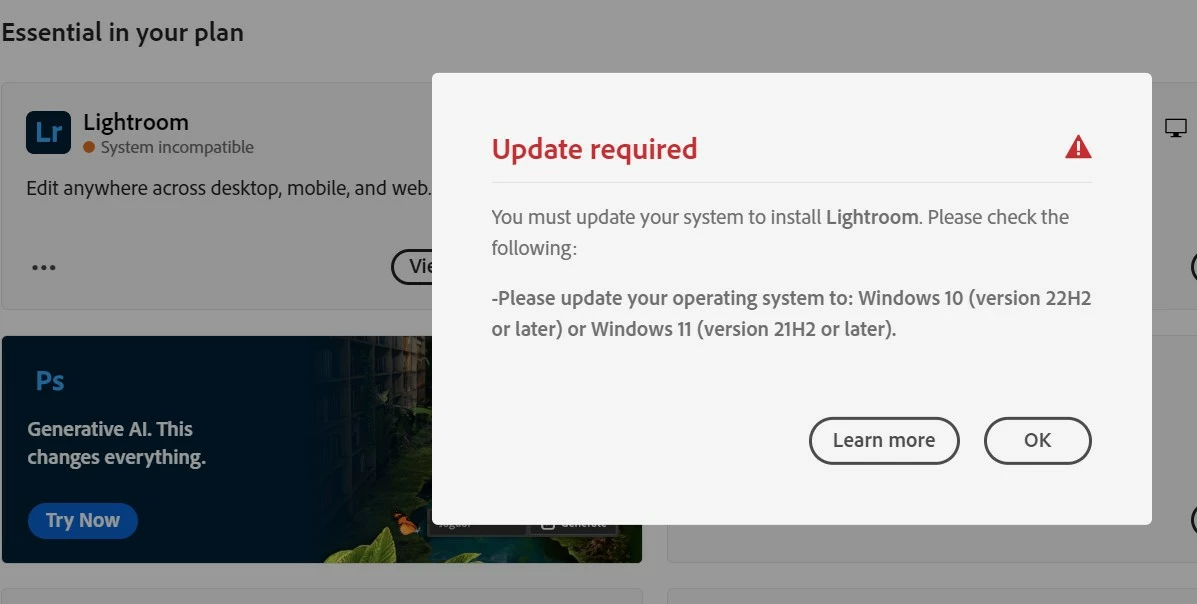
Update required mystery

  • March 13, 2025
  • 1 reply
  • 560 views

I'm running windows 11, version 24H2, it's up to date, working fine, latest drivers etc etc.
I'm at a loss

Correct answer Mr_rossduncan

Thanks for your response 

@Mr_rossduncan

,

Could you please try using another web browser- https://adobe.ly/3Fqv4Xb and let us know if that helps?


Regards,

Tarun


Hi Tarun, I had one of the Adobe support team remote access my computer. It seems there was some kind of bug in the C.C application and it wouldn't or couldn't read the correct data off my P.C.

There was a fair bit of compatability checking on various applications within Windows and a bit of refreshing but everything worked out fine in the end.

Thanks

Ross

1 reply

kglad
Community Expert
Community Expert
March 13, 2025
Mr_rossduncan
Inspiring
March 13, 2025

Hi, thanks for the link, but it leads me to an Adobe site that explains the following.

"Adobe products require the latest operating system and browser updates—both for your security and to ensure that Adobe products function as intended. If you are not using the latest operating system or browser, you may see a warning when you try to sign in to Adobe software"

And therein lies the mystery.

I'm running version 24H2 of windows 11, that's the very latest and up to date version.

As an extra bit of mystery I'm also running the latest versions of all the Adobe apps.

I only noticed the peculiar Update Required request because I tried to download Photoshop Beta and the CC desktop has a warning against all my apps telling me my system needs an update (it doesn't) .

Tarun Saini
Community Manager
Community Manager
March 13, 2025

Thanks for your response 

@Mr_rossduncan

,

Could you please try using another web browser- https://adobe.ly/3Fqv4Xb and let us know if that helps?


Regards,

Tarun