Participating Frequently
October 1, 2026
Answered

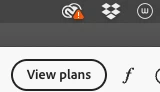
What does the Warning icon on Creative clown mean?

  • October 1, 2026
  • 7 replies
  • 34 views

I’m seeing this for the 1st time. Also, I’ve got nothing in my Libraries to sync. 


    Correct answer Jeff_A_Wright

    Thank you for posting, ​@Stan19.


    I am sorry you are encountering sync issues with your Libraries.

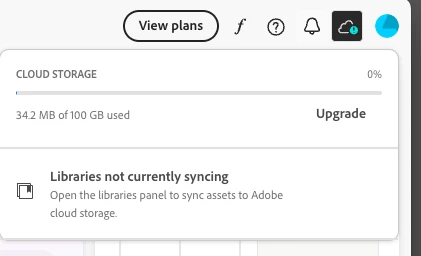
    Based on the screenshot, the warning icon indicates that your Creative Cloud Libraries are not syncing. Since you currently do not have any Library assets syncing, please follow the instructions shown in the warning message and open the Libraries panel from a supported Creative Cloud application. This will allow Creative Cloud to attempt to re-establish synchronization.


    If the warning remains, please review the troubleshooting steps in the following document:

    https://helpx.adobe.com/creative-cloud/apps/troubleshoot/library-and-file-management-issues/error-access-library-panel.html


    Please let us know if you have any additional questions, ​@Stan19.

    7 replies

    Nancy OShea
    Community Expert
    Community Expert
    October 2, 2026

    Creative Clown is catchy. 🤡


    Nancy O'Shea— Product User & Community Expert
    Stan19Author
    Participating Frequently
    October 2, 2026

    Yeah, fat thumbs 🙄

    Jeff_A_Wright
    Community Manager
    Jeff_A_WrightCommunity ManagerCorrect answer
    Community Manager
    October 1, 2026

    Thank you for posting, ​@Stan19.


    I am sorry you are encountering sync issues with your Libraries.

    Based on the screenshot, the warning icon indicates that your Creative Cloud Libraries are not syncing. Since you currently do not have any Library assets syncing, please follow the instructions shown in the warning message and open the Libraries panel from a supported Creative Cloud application. This will allow Creative Cloud to attempt to re-establish synchronization.


    If the warning remains, please review the troubleshooting steps in the following document:

    https://helpx.adobe.com/creative-cloud/apps/troubleshoot/library-and-file-management-issues/error-access-library-panel.html


    Please let us know if you have any additional questions, ​@Stan19.

    Stan19Author
    Participating Frequently
    October 1, 2026

    Thanks. I should’ve said I’m on a Mac

    Jeff_A_Wright
    Community Manager
    Community Manager
    October 1, 2026

    I appreciate the update, ​@Stan19. Please make sure to click on the macOS tab to access the instructions for macOS at https://helpx.adobe.com/creative-cloud/apps/troubleshoot/library-and-file-management-issues/error-access-library-panel.html.