


Inspiring
May 27, 2026
Question

Why are shared documents not accessible?

  • May 27, 2026
  • 4 replies
  • 60 views

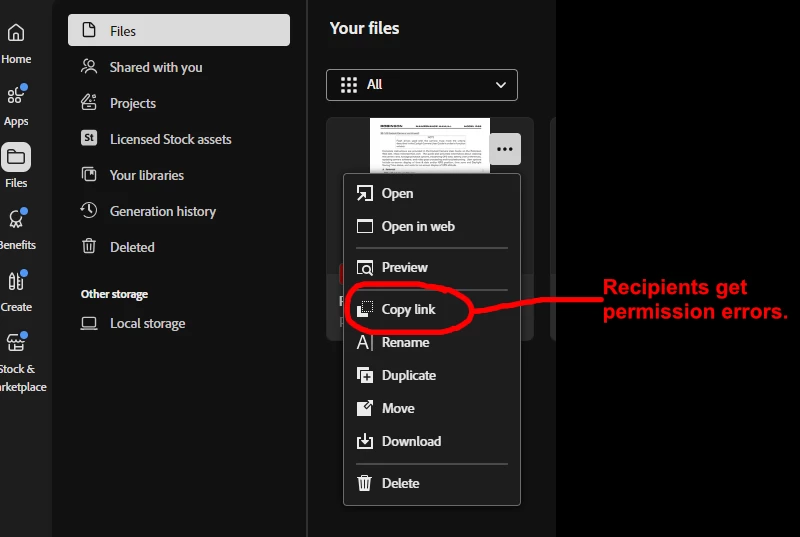
One of the touted payoffs of CC is “collaboration.” So we are attempting to use it, in a review-&-approval use-case. But it doesn’t work, because if we distribute a link to a document we’ve put in CC, the recipients get permission errors. There is no other discoverable way of “sharing” the document.

Anybody have insight on this?

Thanks!
 

    4 replies

    kglad
    Community Expert
    Community Expert
    May 28, 2026

    @Thomas_Calvin 


    did you remove all security settings on the pdf?

    Inspiring
    May 28, 2026

    There weren’t any security settings. Also I didn’t make any change to the file between the link working and not working.

    kglad
    Community Expert
    Community Expert
    May 29, 2026

    @Thomas_Calvin 


    if you select the file on cc do you see “anyone with link can view”?


    Inspiring
    May 27, 2026

    Welp, it turns out that we have a few problems here.

    1. If the file happens to be a PDF, Adobe just removes the Share option from the menu. This is not correct behavior. If an option exists but is simply not currently available, you grey it out. You don’t just make it disappear. This is UI 101. By greying it out, you show the user three critical things:
      A. The function exists.
      B. Where it resides
      C. Some condition must be satisfied to enable it.
    2. The documentation at Share cloud documents suffers from a similar defect: It shows you how to share files, but makes no mention of the fact that the steps don’t apply to PDFs. That critical information is off-screen, at the bottom of the page where you have no reason to scroll because you can see all four steps for file-sharing without scrolling. Why? It should be mentioned in the first section by simply saying “Except PDFs; see below.”
    3. The links created by “copy link” appear to be useless.
    Tarun Saini
    Community Manager
    Community Manager
    May 28, 2026

    Hi ​@Thomas_Calvin,


    We’re sorry to hear about the issue you’re running into. Could you please ask recipients to try opening the link in an incognito window or in a different browser, and to log in again to see if that helps? 


    Regards,

    Tarun


    Inspiring
    May 28, 2026

    Thanks for the follow-up. I think I have determined the pattern.


    If you copy a file into the CC app’s Files area and pick “Copy link” from the three-dots menu, and then send that link around, recipients get a permissions error. Incognito makes no difference.


    If you go back to the item in the CC app and perform the roundabout “Open in web,” “Share”, and “Get a link” method… it appears to fix the state of the document and the original link will work for everyone.

    So this appears to be some internal problem at the CC server that is cleared when you perform the “open in web” steps.

    The only difference between the URLs generated by the two methods is that the regular “Copy link” option creates one that starts with
    https://documentcloud.adobe.com
    whereas the roundabout method creates one that starts with

    https://acrobat.adobe.com


    Once you’ve performed the roundabout method, both of the links will work for everyone.

    Inspiring
    May 27, 2026

    Installed all available updates today and it’s still broken.


    kglad
    Community Expert
    Community Expert
    May 27, 2026

    is this a pdf document?

    Inspiring
    May 27, 2026

    Yep.

    I had a look at the “do not have permission” dialog the recipients get, and the title of the dialog includes the word “review.” So the intent is actually understood at some level. But nobody can access the document.