


MissCatherine
Participating Frequently
May 25, 2018
Answered

Why did CCXProcess suddenly appear in my apps?

  • May 25, 2018
  • 5 replies
  • 31965 views

Hello everyone,

Someone posted this same question a month ago, but no proper explanation was given.

I've had installed Adobe cc 2018 for a while now. And just today I noticed "ccxprocess" app appeared on my Mac's Launchpad (the last icon on the below screenshot).
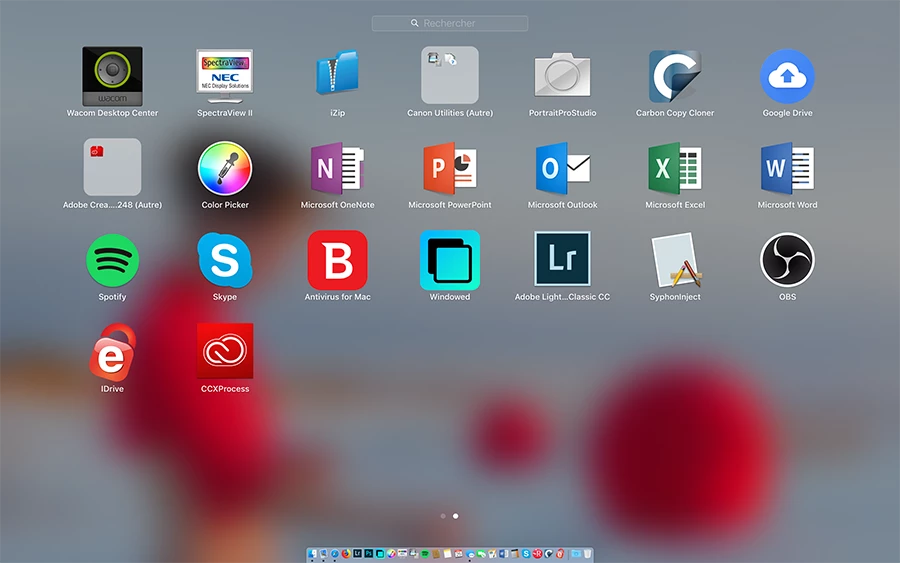
It wasn't there before, just appeared sometime in the last few days. I ran a virus scan using Bitdefender, nothing showed up. I tried deleting it using CleanMyMac 3, but it says the program needs to be closed in order to be deleted. I have no way of closing it.

Why did it just appear? What's it for? Is it some sort of virus?

Does anyone have any insight into this very strange and scary phenomenon?

See original discussion here.

Correct answer kglad

You didn't understand. What I meant was for you to report that issue.


@bartosz_0677 


you'll need to do that yourself, to make suggestisons to adobe, https://www.adobe.com/products/wishform.html

5 replies

Participating Frequently
March 24, 2023

There are TWO main issues here:

1) Any application on MacOS must be signed - this one is not. A developer like Adobe - not knows better than to install and operate unsigned executables after the rest of the applications are installed.
2) An application as big and complex as the Adobe suite - should have a published list of components - All of them. The worst part of all this - is that this is not a forums topic. Adobe support needs to own it - no one on the forums will have that answer.

Without both #1 anfd #2 - all users should simply disable it and delete it, since it wasn't important enough for Adobe to document.

kglad
Community Expert
Community Expert
March 24, 2023

@MadMac89 


these are user-to-user forums.


 for applicable apps, you can make (some) suggestions to adobe here, https://helpx.adobe.com/ie/x-productkb/global/how-to-user-voice.html


for others, use https://www.adobe.com/products/wishform.html

Participating Frequently
March 24, 2023

Completely agree about this being a forum. I'm reacting to the comment that Adobe support said the issue was for user forums and not their support. I'm also a fan of reporting problems like this - thank you for the link.

Participant
October 25, 2021

Same for me3 - and the file keeps crashing my IT. Really ticked off by this software.


Participating Frequently
December 10, 2020

The CCX process drives my Intel Macbook pro into the ground, It starts off ok... then gradually consumes more and more processor and the fans ramp up to the point where the mac tries to take-off. The entire mac grinds almost to a halt. Force quitting CCX Process and binning the offending CCX app, fixes the issue and the mac returns to its happy place and normal speedy performance..... for a little while. The Adobe CC software obviously re-installs this and I do the same thing over and over. Adobe, I don't want the CCX process, all the Adobe apps seem to run just fine without the CCX app - It's the Adobe CCX Virus!

Most likely a really badly coded app, written by whatever 5-year-old Adobe just employed to engineering. Might be a little harsh but Adobe is far from a professional software company if this gets out the door.

Participant
February 9, 2019

MissCatherine​  It's not a virus and is completely harmless.

It's part of Adobe Creative Cloud and it's purpose is to allow the user to move seamlessly between Adobe CC apps. It's actually pretty handy if you use Adobe CC a lot and often need to move between apps.

There's really no need to worry about it.

MissCatherine
Participating Frequently
May 25, 2018

I found a way to close and delete CCXProcess.

I followed the instructions found on this site to close the program, then deleted it using CleanMyMac 3.

Still would REALLY like knowing WHAT it was and HOW it got in my apps.

Inspiring
June 10, 2018

I contacted Adobe to get some information about the tons of processes Adobe installs and runs on my computer without any prior warning or request for permission.

Got a reply: "This is a great question that is best suited for our forums..." the rest was zero informative. So I did not get any wiser than before I got a vague impression CCXProcess may have something to do with CC file syncing.

It really would be basic customer service to give us more information what all these processes are.

MissCatherine
Participating Frequently
June 10, 2018

Thanks for your input Rocketbottle.

I couldn't agree more, it "really would be basic customer service to give us more information what all these processes are"...