mardus
Known Participant
February 8, 2023
Question

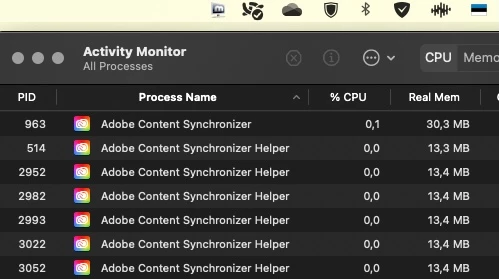
"Adobe Content Synchronizer Helper Helper Helper Helper Helper Helper ...."

  • February 8, 2023
  • 1 reply
  • 648 views

Wth is this?

(probably the most common wording regarding the openings on this forum, or at least should be)


I don't even have CC running (as you can see from the screenshot menu bar)... I have the "cloud content" turned OFF in the actual CC install (I myself created the install package). I have all the libraries and "learning" and such useless nonsense closed in every workspace in every app.
So what "content" are we "synchronizing", with who and for what purpose?!!
And how do I disable it from running EVER AGAIN?

If anything, please answer the last question. Thank you.

This topic has been closed for replies.

1 reply

kglad
Community Expert
Community Expert
February 8, 2023

there are quit a few adobe background processes:


https://helpx.adobe.com/x-productkb/global/adobe-background-processes.html

mardus
mardusAuthor
Known Participant
February 16, 2023

Oh, gee... REALLY? Colour me shocked!

But thank You for this fantastic, albeit absolutely useless, insight.

If there are other community "experts" waiting to shine in with this kind of quality information, feel free to... 😌


kglad
Community Expert
Community Expert
February 16, 2023

@mardus 


you asked: "So what "content" are we "synchronizing", with who and for what purpose?!!
And how do I disable it from running EVER AGAIN?"


the first question is answered above and for the second you would need to uninstall everything adobe, clean and then install each adobe app using a direction download installer.