

Adobe Creative Cloud App - The Creative Cloud App Does Not Show Up In Applications (MacBook Pro)
How To Find The Adobe Creative Cloud App On A MacBook Pro
When I access my applications on my MacBook Pro, I usually click an icon below named "Launchpad" ( It looks like a rocket ship). This shows me which apps I have access to on my mac. I can see all my adobe products like Photoshop, Dreamweaver, Illustrator, etc. However, I do not see the Creative Cloud app in this folder.
The Adobe Creative Cloud app allows for me to install and un-install these applications (Photoshop, Dreamweaver, Illustrator) easily. It also allows for me to update any Adobe applications that may need updating.
I've come to realize that the Adobe Creative Cloud App, is not stored on my computer like traditional apps are stored on a computer.
Usually when I download an app, I can find the app in the "Applications Folder".
But the Adobe Creative Cloud app is not visible in the "Applications Folder".
The Creative Cloud App is only visible after navigating to the "ACC folder"
The path to the ACC folder is the following
Applications / Utilities / Adobe Creative Cloud / ACC / Creative Cloud app.
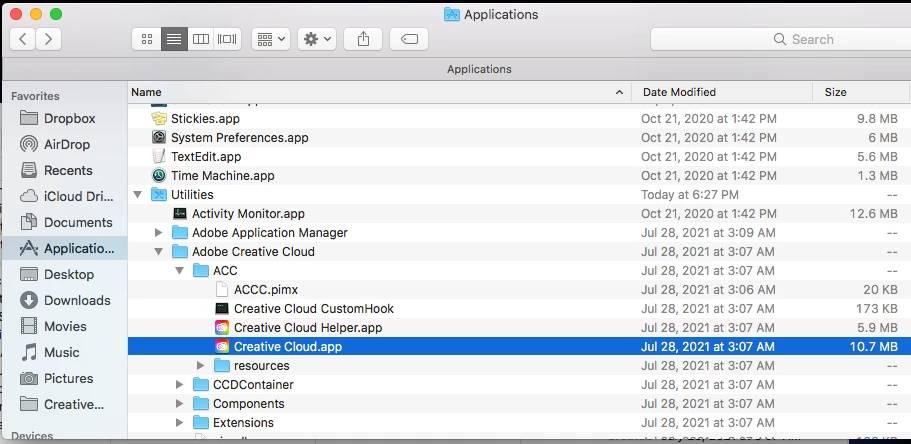
I do not know why it is installed this way, but it is.
I hope this helps anyone looking to access the Adobe Creative Cloud app.


 AdChoices