
Participant
December 21, 2024
Answered

Adobe Creative Cloud "Broken" Screen

  • December 21, 2024
  • 2 replies
  • 230 views

When i turn on Adobe Photshop or Adobe Creative Cloud, this is what alway happen, does anyone know the issue?
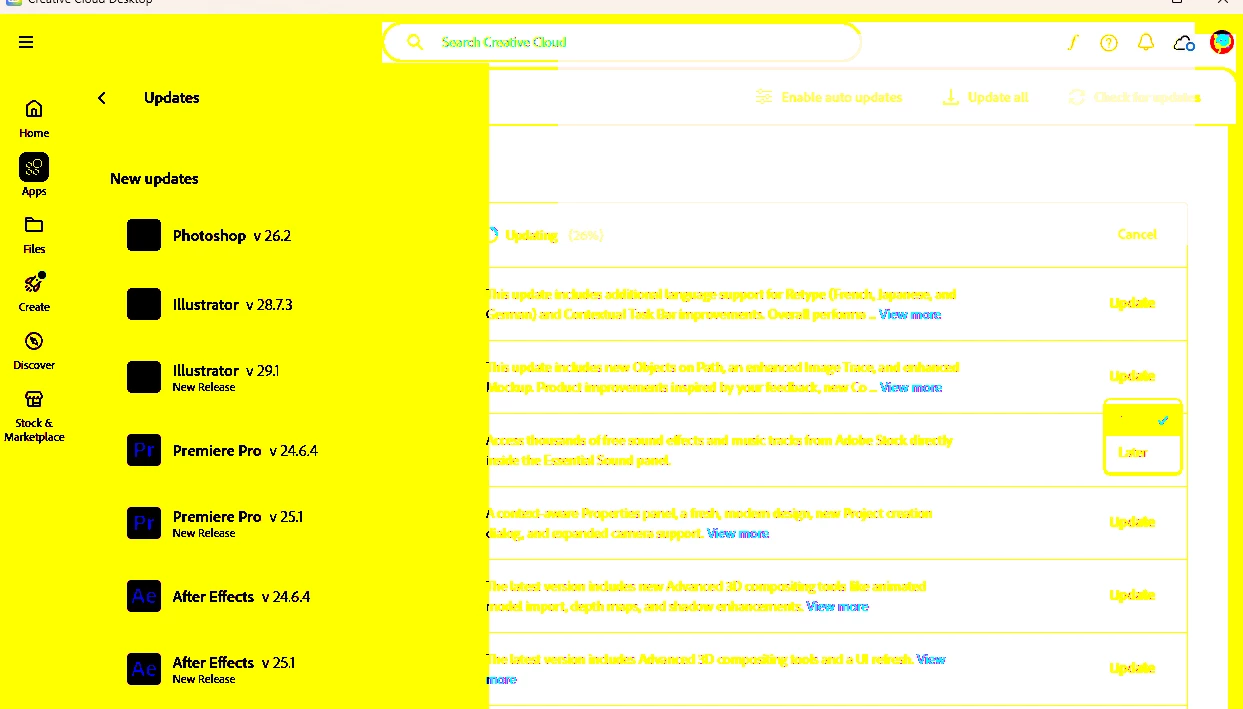

This topic has been closed for replies.
Correct answer Peru Bob

Try updating or rolling back your graphics driver directly from the video card manufacturer’s site. If NVIDIA, do a clean installation of the latest Studio Driver (NOT the Game Driver).

2 replies

Peru Bob
Community Expert
Community Expert
December 21, 2024

Try resetting the CC App.
To reset the Creative Cloud desktop app, make sure it's in the foreground, then press:
Win: Ctrl + Alt + R
Mac: Cmd + Opt + R

If that doesn't work, try uninstalling and reinstalling the CC App:
https://helpx.adobe.com/creative-cloud/help/uninstall-creative-cloud-desktop-app.html
https://helpx.adobe.com/download-install/kb/creative-cloud-desktop-app-download.html

Peru Bob
Community Expert
Peru BobCommunity ExpertCorrect answer
Community Expert
December 21, 2024

Try updating or rolling back your graphics driver directly from the video card manufacturer’s site. If NVIDIA, do a clean installation of the latest Studio Driver (NOT the Game Driver).

Participant
December 21, 2024

Thanks for your help, sir. i solved the problem

Peru Bob
Community Expert
Community Expert
December 21, 2024

You're welcome.