
November 21, 2019
Question

Adobe GC Invoker Utility Madness

  • November 21, 2019
  • 3 replies
  • 14319 views

Has anyone seen this happen? My machine started running very slowly and when I launched the Task Manager I saw this:
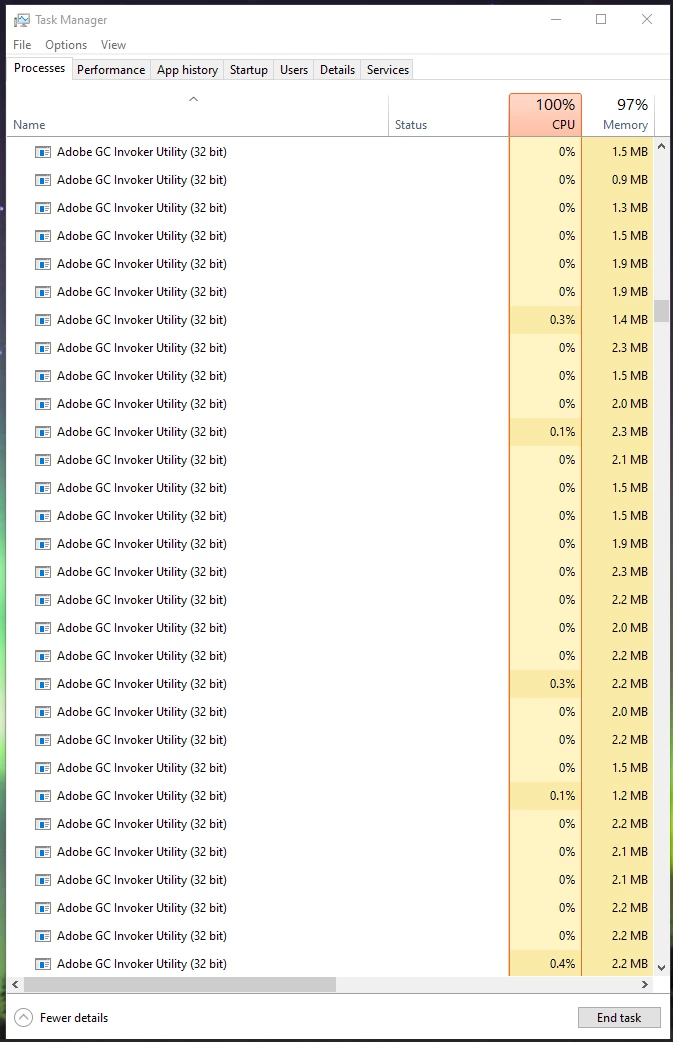
I have no idea what Adobe GC Invoker Utility is or why it's consuming so many resources. Anyone have any ideas?

This topic has been closed for replies.

3 replies

Participant
February 17, 2020
  1. Hey... Just go to common files and delete all the Adobe applications. Works for sure. Fixed by @saikrishna_guna
Participant
October 18, 2020

Any updates on this problem as half the processes running on my system are adobe and no number of 'end task' removes or disables the bloatware. Really annoying!

Participating Frequently
October 18, 2020

Not from me, I've learnt to suck it up and accept Adobe software is by its very nature bloat with crap piled on top of whatever its core function is. For me Acrobat Pro DC is just too useful for what I do.

Just Shoot Me
Legend
December 4, 2019
December 4, 2019

There is nothing helpful in that discussion.

Participating Frequently
November 30, 2019

I am having the same problem. Deleted files based on past threads and disabled all the Adobe bloatware on Window startup but the problem came back with a vengence a day or say later. Makes system useless for about half a cup of coffee on startup.


Participating Frequently
December 4, 2019

Is anyone able to advise how to get Adobe to address this issue, I have a monthly Acrobat Pro subsciption and expect better quality software than this bloat. Its an annoying waste of system resources and occasionaly is inconvenient.


Failing getting Adobe onto this, can anyone advise a good alternative to Adobe Acrobat Pro that has the same features?

December 4, 2019

Maybe someone who has Enterprise Support with their account can submit this as a ticket?