jkane3983
Participant
July 17, 2017
Answered

Adobe Libraries

  • July 17, 2017
  • 2 replies
  • 391 views

Hello,

I am having issues with collaborators updating artwork within the CC libraries. It is not that they are updating work that is the problem. It is that once they update their work and save it within the library, none of the other collaborators have the updated artwork, just the original. Only the person that dows the work can update the files. Has anyone else had an issue with this? Am I missing a setting or is this a glitch within the library system itself?  Thank You!

This topic has been closed for replies.
Correct answer AnneMarie Concepcion

It helps if all users are on the latest version of InDesign, which is CC 2017.1 ... do you know everyone's versions? Or ask them to check their CC application to see if there are any InDesign updates available.

Assuming everyone's on the current or recent version of CC, you can make the problem CC library active in the CC Libraries panel, then in the panel menu choose Collaborate. That will jump you to your CC Assets page in your browser and open up the Collaboration panel for that library (wish we could see this in ID). There, make sure the other users -- the non-owners -- have Edit privileges, not just View privileges. It should show "Can Edit" next to their names.
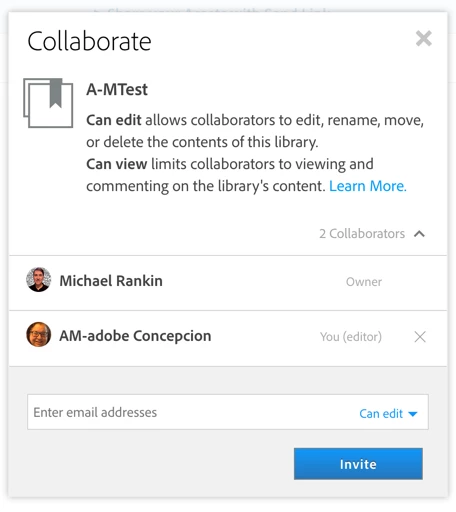
If no one's name shows up here other than yours (the owner's), that means you Shared the library instead of Collaborated. I've seen that happen. The terminology is confusing.

Finally if everyone's name is there in the Collaborate panel and they're listed as Edit, then you might want to troubleshoot if it's an ID problem vs. some sort of firewall or security situation at their locations. See if you can share a CC Files folder with them, for example, and add/remove items.

Hope that helps!

AM

2 replies

AnneMarie Concepcion
Community Expert
AnneMarie ConcepcionCommunity ExpertCorrect answer
Community Expert
July 18, 2017

It helps if all users are on the latest version of InDesign, which is CC 2017.1 ... do you know everyone's versions? Or ask them to check their CC application to see if there are any InDesign updates available.

Assuming everyone's on the current or recent version of CC, you can make the problem CC library active in the CC Libraries panel, then in the panel menu choose Collaborate. That will jump you to your CC Assets page in your browser and open up the Collaboration panel for that library (wish we could see this in ID). There, make sure the other users -- the non-owners -- have Edit privileges, not just View privileges. It should show "Can Edit" next to their names.

If no one's name shows up here other than yours (the owner's), that means you Shared the library instead of Collaborated. I've seen that happen. The terminology is confusing.

Finally if everyone's name is there in the Collaborate panel and they're listed as Edit, then you might want to troubleshoot if it's an ID problem vs. some sort of firewall or security situation at their locations. See if you can share a CC Files folder with them, for example, and add/remove items.

Hope that helps!

AM

Sheena Kaul
Legend
July 18, 2017