
Participant
April 11, 2021
Question

Adobe loading unwanted programs on my computer on start.

  • April 11, 2021
  • 2 replies
  • 647 views

What is a normal (something that doesn't involve a "possible fix" or 3+ steps) way to not have adobe start its spyware  "help" or "updates" applications?


I set all of the adobe malware   "software" to not start with windows following the guides on this site and forum. Here is what I need to do every time I start my computer or close an adobe application:

https://i.imgur.com/5owArW8.mp4


I just restarted my computer and....
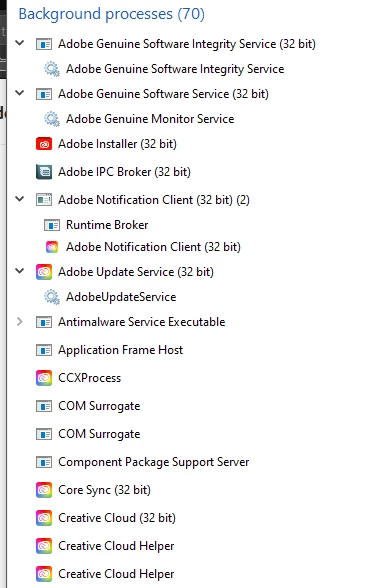


This topic has been closed for replies.

2 replies

Nancy OShea
Community Expert
Community Expert
April 11, 2021

Background processes are essential for your Creative Cloud subscription to work.  When not in use, the CPU load is 0%.  To quit Creative Cloud Desktop app, use Ctrl+W and hit the Quit button.  I also removed CC Desktop App from launching on startup as detailed below.

https://www.intowindows.com/how-to-remove-programs-from-startup-in-windows-10/


Nancy O'Shea— Product User & Community Expert
kglad
Community Expert
Community Expert
April 11, 2021

you have to uninstall all adobe programs and then clean your computer:


uninstall every cc app including preferences, https://helpx.adobe.com/creative-cloud/help/uninstall-remove-app.html
then uninstall the cc desktop app, https://helpx.adobe.com/creative-cloud/help/uninstall-creative-cloud-desktop-app.html
clean your computer of cc files per http://www.adobe.com/support/contact/cscleanertool.html


this is an fyi, https://helpx.adobe.com/x-productkb/global/adobe-background-processes.html


additional info, you can write your own script to terminate unwanted adobe programs.  and that script may need to be re-written every time you update the adobe cc app.


C5C4EAuthor
Participant
April 11, 2021

1 - I'm not asking how to uninstall it as I paid for it and want to use it. When I start windows... I don't want anything from adobe loading. When I start an adobe application, they can run all the bloatware and spyware they want. How do I do this without coding a custom script?

2 - There is a check box in the settings that allows you to choose weather adobe runs when you start windows. That check box is there to deceive people into thinking all those apps are not running when you start windows?

3 - I have to go to 3 different help pages to uninstall the "software". How is that acceptable?


kglad
Community Expert
Community Expert
April 11, 2021

i didn't say anything about "acceptable"  i just gave you relevant info.


btw, these are user-to-user forums.  if you want to make a "suggestion" to adobe, use this, https://www.adobe.com/products/wishform.html