
Inspiring
January 18, 2023
Answered

Adobe portfolio custom domain shows white page

  • January 18, 2023
  • 2 replies
  • 539 views

I have linked my portfolio page to my website lekkerkort.com using the Manually-configuring-a-custom-domain page. Everything seems to work, and the page is properly propagated  trough the DNS system.

If you visit the URL  you even get the lock  so the page is verified trough let's encrypt.


The problem is you only see a blank page.

If I view source i see the following:
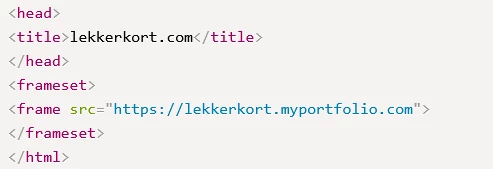
This is not right as it creates a loop, because if you visit lekkerkort.myportfolio.com you get redirected to lekkerkort.com creating a loop.


I have tried removing and re-adding the domain as suggested by the help page.


Please help me fix this

This topic has been closed for replies.
Correct answer Kees Veling

It works now! Just needed to wait a few hours.

2 replies

Nancy OShea
Community Expert
Community Expert
January 18, 2023

Yourname.myportfolio is the default domain name assigned by Portfolio.


A custom domain (example.com) would be something you purchased separately.

https://help.myportfolio.com/hc/en-us/articles/216489627-Manually-configuring-a-custom-domain


Nancy O'Shea— Product User & Community Expert
Kees VelingAuthorCorrect answer
Inspiring
January 18, 2023

It works now! Just needed to wait a few hours.

kglad
Community Expert
Community Expert
January 18, 2023

that's good to hear, and hopefully helps someone else.