
Participating Frequently
July 10, 2023
Answered

Adobe Portfolio: Darstellungsfehler des Zeilenabstands in Smartphone-Ansicht

  • July 10, 2023
  • 2 replies
  • 568 views

Hallo liebe Community,

ich habe einen Text-Darstellungsfehler auf meiner Portfolio-Website, wenn diese hochkant auf Smartphones angezeigt wird - hier rutscht der Zeilenabstand zusammen und der Text wird unleserlich. In allen anderen Darstellungsformen (Smartphone quer, PC, Tablet) klappt es einwandfrei.

Ich habe bereits versucht die Texte neu hinzuzufügen, aber das Problem bleibt bestehen und alle Textcontainer der Website sind betroffen. Freue mich über jeden Tipp, wie die Website auch auf dem Smartphone repräsentativ wiedergegeben werden kann!

Viele Grüße

Dennis
This topic has been closed for replies.
Correct answer Nancy OShea

I believe you and I also made the experience when starting a completely new portfolio site the problem does no longer exist even though I work in the same browser. But for this site which contains over 20 pages that each have several containers of text and image I would unlikely build it all again from scratch 😞


@dennisk19752131,

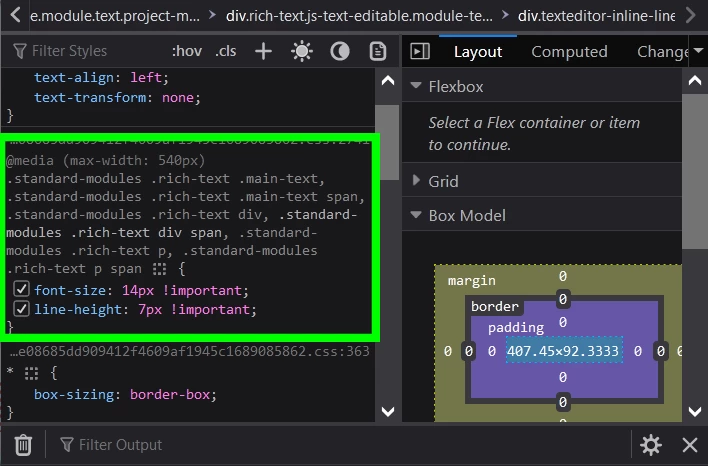
The culprit is a corrupted site style, specifically in the mobile media query.  Possibly caused by conflicting customizations over time.  See screenshot.


You could reset your global site styles to their default settings

https://help.myportfolio.com/hc/articles/115002863953-Restoring-website-styles-to-your-published-version


Or switch to a new Theme.  Currently there are  12 Themes to choose from described below.


Hope that helps.


2 replies

Nancy OShea
Community Expert
Community Expert
July 10, 2023

Try reducing the zoom on your smartphone to normal or 100% magnification.


Nancy O'Shea— Product User & Community Expert
Participating Frequently
July 11, 2023

It's normal zoom mode. I checked the the page from other smartphones and found the same problem. 

Also when I edit the page in portfolio browser application and switch between devices it happens.

Here on the left you see a correct view and on the right when I switch to smartphone view the text gets compressed and unreadable.

kglad
Community Expert
Community Expert
July 11, 2023

@dennisk19752131 


what's your portfolio site url?

John T Smith
Community Expert
Community Expert
July 10, 2023