Participant
July 27, 2022
Question

Adobe Portfolio Link Issues

  • July 27, 2022
  • 1 reply
  • 256 views

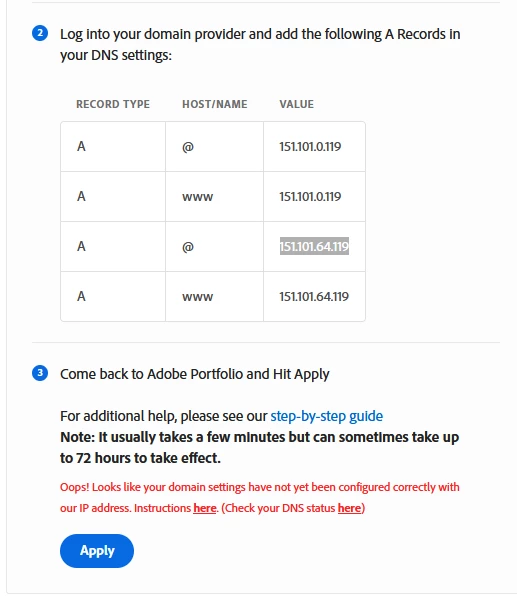
I bought a *.com Domain today and have linked the four given A records on the providers nameserver.

When I try to open the website, I get redirected to the Adobe Portfolio missing page website. Furthermore, if I try to link it on the Portfolio site, it tells me the IPs weren't properly linked, even though the  DNS Propagation Checker shows me that the vast majority of DNS servers know the new IPs.


Am I doing something wrong?

 

This topic has been closed for replies.

1 reply

Tarun Saini
Community Manager
Community Manager
July 27, 2022

Hi @Steven231221563o0r 


Thanks for reaching out. Please check this article and let us know if that helps: https://help.myportfolio.com/hc/en-us/categories/360002765773-Domain-Names


See Portfolio links:
- FAQ & Knowledgebase for product help - https://help.myportfolio.com/hc/

- Contact Portfolio Support for technical help - https://help.myportfolio.com/hc/requests/new?ticket_form_id=177168


Regards,

Tarun

Participant
July 27, 2022

No, I've already read the documentation

Nancy OShea
Community Expert
Community Expert
July 28, 2022

If I remember correctly only 2 A records are required.

Also allow a few hours for the DNS changes to populate.


Nancy O'Shea— Product User & Community Expert