Gerard Puigmal
Participant
September 5, 2023
Answered

Adobe Portfolio : mobile menu not showing when using dark version of 'Thomas' design

  • September 5, 2023
  • 2 replies
  • 1197 views

Hi there!


I'm using the dark version of the 'thomas' website design on Adobe Portfolio and basically the mobile menu is not showing. It does show when in the light version because the menu symbol is in black. Is there anyway to change the colour that I can't see?


Thanks a lot!

Correct answer Nancy OShea

So you want to change the color of your mobile icons (hamburger and X) from dark to light for better contrast -- is that the gist of it?


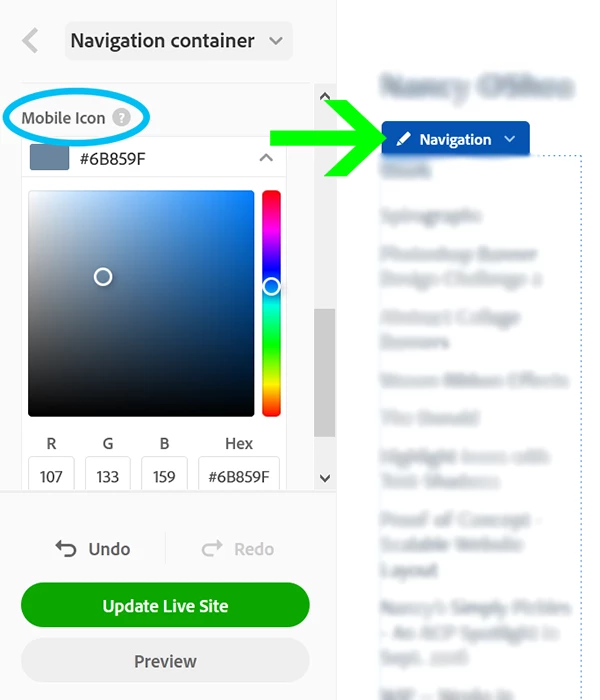
Open your editing console and click on blue Navigation box. Select Customize. See screenshot.

In the left panel, scroll down to Mobile Icon and choose a different color. Update Live Site to see results.

Hope that helps.


2 replies

Nancy OShea
Community Expert
Nancy OSheaCommunity ExpertCorrect answer
Community Expert
September 5, 2023

So you want to change the color of your mobile icons (hamburger and X) from dark to light for better contrast -- is that the gist of it?


Open your editing console and click on blue Navigation box. Select Customize. See screenshot.

In the left panel, scroll down to Mobile Icon and choose a different color. Update Live Site to see results.

Hope that helps.


Nancy O'Shea— Product User & Community Expert
Participant
March 2, 2025

Excellent! That works 🙂 

kglad
Community Expert
Community Expert
September 5, 2023