Known Participant
February 1, 2023
Answered

Adobe Portfolio navigation on Welcome page - no navigation?

  • February 1, 2023
  • 3 replies
  • 10782 views

Hi - I'm new to AP and as I was building out my site, I wanted to have a welcome page with an intro message, and use it as my home page, but I see that according to Adobe, the navigation is hidden on the Welcome page - Why? and can I add it in? How is anyone going to get to the collections otherwise?

thanks in advance. 

- Karl

    Correct answer Nancy OShea

    As stated 2 years ago: See Page Types Explained


    3 replies

    Participant
    May 21, 2025

    **FOR ANYONE STUCK AND WANT TO MAKE A HOMEPAGE WITH NAVIGATION BUTTONS**

    You will be met with snark answers everywhere you turn (people tend to feel insecure when they can't answer your question), so let me save you some time:


    Adobe Portfolio is very finicky. You cannot add navigation buttons to a page that is set as a homepage. Because it's a different page entirely? Well, no. Despite what the answers here will tell you.


    It's not possible because Adobe simply didn't program it to work (in other words, they could easily fix it).

    Now, thankfully, bad design has one plus side: it's easy to get around.


    The solution:

    Unfortunately, if you already set up your homepage and make it look all pretty, it may have been for nothing, because you will have to make a new page, BUT, you CAN have navigation buttons on your home page. First, you have to create a regular page. DO NOT tick the "make this a homepage" button, because literally all that does is remove the navigation bar.


    Set up your page FIRST. If you did not tick the "homepage" button when creating the page, you should already have a navigation bar at the top. Now, set up your page as if you were setting up your homepage. When you are done, THEN simply switch your page to a homepage. You will keep your info, and the faulty programming works in your favor, you will still have the navigation bar. 


    TLDR: Set up your page first. THEN make it a homepage. It will keep the navigation buttons.

    Nancy OShea
    Community Expert
    Nancy OSheaCommunity ExpertCorrect answer
    Community Expert
    May 21, 2025

    As stated 2 years ago: See Page Types Explained


    Nancy O'Shea— Product User & Community Expert
    Participant
    April 21, 2023

    Did you figure this out? Im stuck on the same thing...

    Nancy OShea
    Community Expert
    Community Expert
    April 21, 2023

    @John29507028y09e,

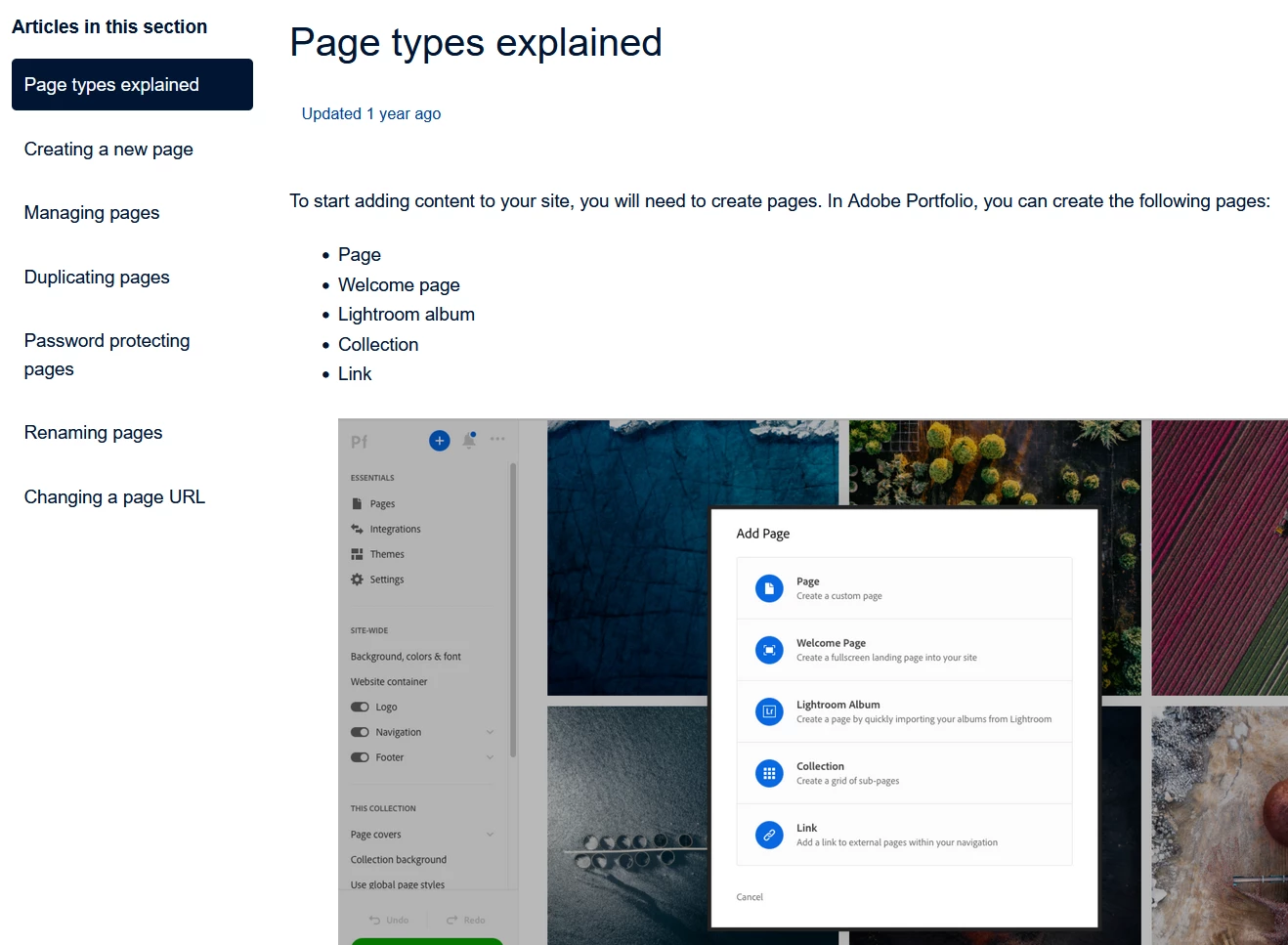
    Welcome pages (formerly called Intro or Splash pages) do not contain navigation menus because they are separate from your main Portfolio website. 


    Welcome pages are typically used as one-page websites for showcasing news about an upcoming event  -- i.e. a new product, a gallery show, a convention/trade show or some other time-sensitive announcement.  You may add buttons or text links to Welcome pages.  But if you need a navigation menu, you should start over and create a new site Page instead.


    Portfolio Page Types Explained:

    httpss://helpmyportfolioo.comhcc/articles/360035998273-Page-types-explained


    Hope that helps.


    Nancy O'Shea— Product User & Community Expert
    Known Participant
    June 20, 2023

    So I have just built my homepage as a Welcome Page, and now I want to add a simple menu-link to an "about"-page. Are you saying, that I know need to rebuild the page as another type of page in order to add a navigation?? This is so stupid. Why would you call it "WELCOME" page, when it can't be used as a homepage?? Is there even an option to copy elements to another page or convert a welcome page to another kind of page??

    kglad
    Community Expert
    Community Expert
    February 1, 2023

    pick a portfolio template that has the layout you want.


    portfolio questions: https://help.myportfolio.com/hc/en-us/requests/new?ticket_form_id=177168


    portfolio faq: https://help.myportfolio.com/hc/en-us


    in the future, to find the best place to post your message, use the list here, https://community.adobe.com/


    p.s. i don't think the adobe website, and forums in particular, are easy to navigate, so don't spend a lot of time searching that forum list. do your best and we'll move the post if it helps you get responses.


    <moved from using the community>

    KTA6Author
    Known Participant
    February 1, 2023

    thanks for the reply and you're correct, it hasn't been easy to navigate this site to the correct spot, so thanks for the link


    kglad
    Community Expert
    Community Expert
    February 1, 2023
    quote

    ..it hasn't been easy to navigate this site...


    By @KTA6


    a truer statement has been rarely made.