Participant
May 22, 2025
Answered

Adobe Portfolio Text Alignment Issue

  • May 22, 2025
  • 1 reply
  • 178 views

Why doesn't adobe porfolio allow you to type text that isn't centered. Even a normal text box you can;t just type left to right and it be right aligned like a book.

This is a great example of what I'm talking about. See how these words in this post are left aligned and the sentences aren't aligned to the middle of the page. 

Correct answer Nancy OShea

Global paragraph styles are determined by your Portfolio Theme. 

There are 12 Themes to choose from, each with their own features.

https://help.myportfolio.com/hc/articles/360035995733-Themes-features

https://help.myportfolio.com/hc/articles/360035496294-Comparing-themes


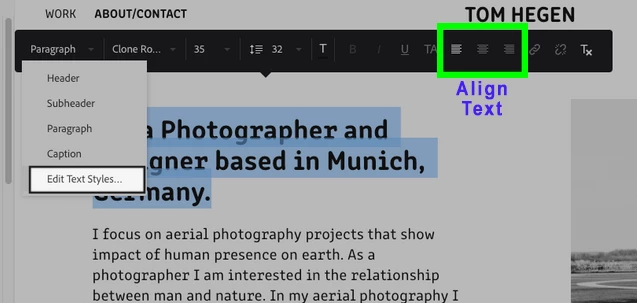
See Screenshot

https://help.myportfolio.com/hc/articles/360038553154-Styling-Text-types


Hope that helps.


1 reply

Nancy OShea
Community Expert
Nancy OSheaCommunity ExpertCorrect answer
Community Expert
May 22, 2025

Global paragraph styles are determined by your Portfolio Theme. 

There are 12 Themes to choose from, each with their own features.

https://help.myportfolio.com/hc/articles/360035995733-Themes-features

https://help.myportfolio.com/hc/articles/360035496294-Comparing-themes


See Screenshot

https://help.myportfolio.com/hc/articles/360038553154-Styling-Text-types


Hope that helps.


Nancy O'Shea— Product User & Community Expert