

Participant
November 7, 2020
Answered

Adobe Portfolio - The Picture Grid "Zoom" Parameter is Gone!?

  • November 7, 2020
  • 3 replies
  • 1861 views

Hello Adobe Community, 


I where editing on Adobe Portfolio now, and where to upload photos to the picture grid option and felt a bit perplexed as I where to edit the size of the image within the grid, as the option parameter to determine each individual picture size within the grid where no longer there; The slider-button to "zoom" within the grid is absent in both Chrome and Firefox.


At first I tried to use the browsers zoom ability to see if the parameter where just beyond the frame of the browser or just down below somewhere, but this was not the case. Is this button / parameter been taken "away" or is it a technical glitch? 


I would like to have it back as I pay good money for this, and since I thought this was a nifty feature as it made the experience of Adobe Portfolio a bit easier in terms of marketing and showcasing. 
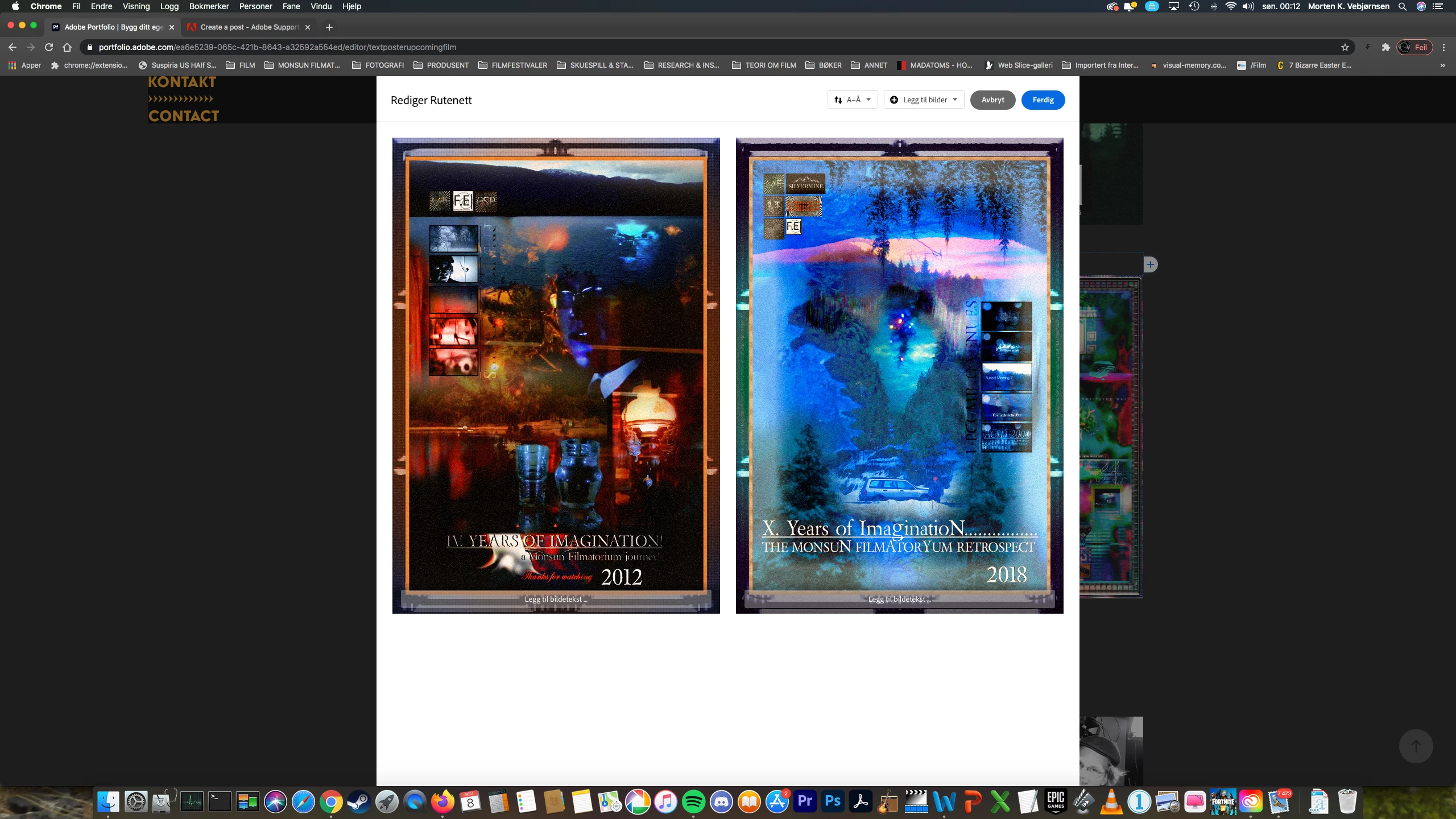


I uploaded a picture to showcase the window I am talking about, no ability to "zoom" and  or to determine the size of these images suddenly no "longer exist"


Does anyone have the same "issue" or have a solution to this thing!? 


Best regards, 

Morten K. Vebjørnsen 

[E-mail removed by moderator as per forum policy.]

This topic has been closed for replies.
Correct answer Nancy OShea

Did you enable the Lightbox for images in your settings?

https://help.myportfolio.com/hc/en-us/articles/360038427913-Enabling-disabling-Lightbox-for-images


Below is a PhotoGrid with Lightbox enabled.  It works fine for me in Firefox and Chrome on Desktops.

https://nancyoshea.myportfolio.com/

Use ← and →  to advance slides.  Click on X to close.


3 replies

Participant
September 4, 2023

Yes. I am also facing this problem

kglad
Community Expert
Community Expert
September 4, 2023

portfolio questions: https://help.myportfolio.com/hc/en-us/requests/new?ticket_form_id=177168


portfolio faq: https://help.myportfolio.com/hc/en-us


<moved from download & install>

Nancy OShea
Community Expert
Nancy OSheaCommunity ExpertCorrect answer
Community Expert
November 8, 2020

Did you enable the Lightbox for images in your settings?

https://help.myportfolio.com/hc/en-us/articles/360038427913-Enabling-disabling-Lightbox-for-images


Below is a PhotoGrid with Lightbox enabled.  It works fine for me in Firefox and Chrome on Desktops.

https://nancyoshea.myportfolio.com/

Use ← and →  to advance slides.  Click on X to close.


Nancy O'Shea— Product User & Community Expert