
Participant
March 9, 2021
Question

AGMService memory error

  • March 9, 2021
  • 2 replies
  • 1584 views

I keep getting this popup everytime I open Windows.
I tried to reinstall Creative Cloud and rearranging my RAM to see, if the addresses changed. They didn't.
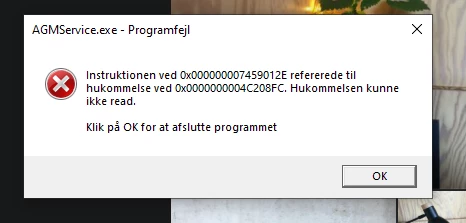
English translation: Instruction at 0x0... referred to memory at 0x0.... The memory couldn't read.
Click OK to terminate the program.

This topic has been closed for replies.

2 replies

Participant
March 1, 2022

I Fixed this error right now into, the problem is with program Called Adobe Genuine Software. 
I just uninstall this and the error was fixed.

Something crash the app after software update (Not Windows, Adobe.) 

John T Smith
Community Expert
Community Expert
March 9, 2021

What makes you think that has anything to do with Adobe?


>popup everytime I open Windows

That MAY be a Microsoft problem, so you need a Microsoft solution
Go to the Search bar at the top of http://www.microsoft.com/en-us/ to find and re-install the C runtime, or for ALL Windows help
-or direct to https://support.microsoft.com/en-us/help/2977003/the-latest-supported-visual-c-downloads
https://helpx.adobe.com/x-productkb/global/troubleshoot-c-runtime-errors-products.html

Participant
March 9, 2021

Well according to Google AGMService is a part of Adobe Genuine Software Service.
It also pops-up everytime I open up Photoshop, and when I remove Creative Cloud it is gone.