

Jon-M-Spear
Legend
August 31, 2021
Question

All Apps Keep Crashing

  • August 31, 2021
  • 6 replies
  • 1515 views

Here we go again. 


Yesterday I had to sign in to Creative Cloud every time I opened either Photoshop, Lightroom Classic, Lightroom and Bridge.


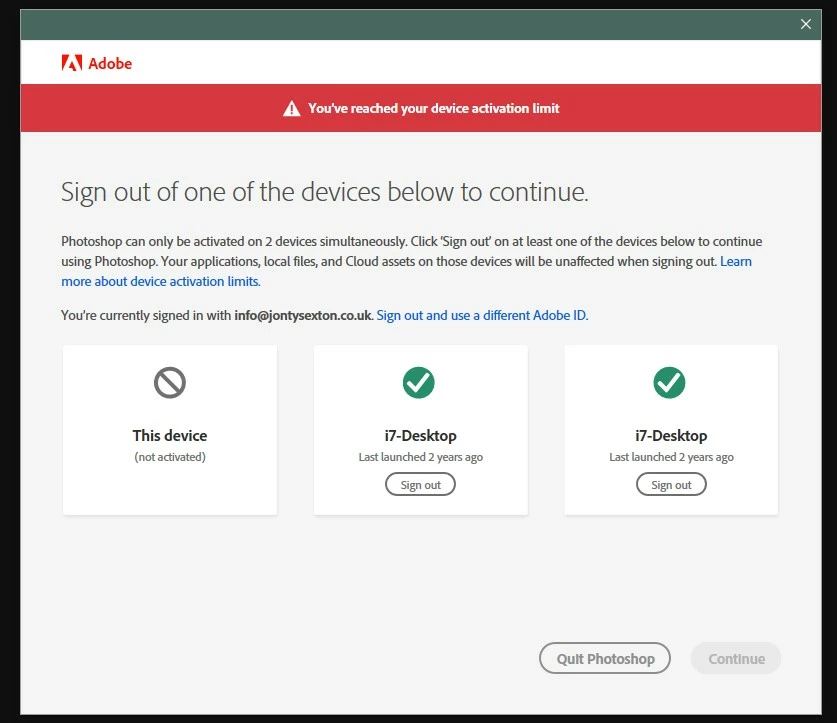
Then I received the Activation Limit warning - although both PCs listed are the same PC I'm trying to log in with.  It says last launched 2 years ago!  Strange, because I've been using these apps fairly solidly for the past 2 years. I cleared the activated computers via my account settings.


Today, every app is again requiring a sign in.  Once successfully signed in, they crash after about 10 seconds.


Why oh why is this a recurring problem?   Can anyone please definitevely tell me the reason for it.  Thanks.


This topic has been closed for replies.

6 replies

Jon-M-Spear
Legend
September 14, 2021

Jeff, I am making very specific back-ups of folders on non-system drives.

Jeffrey_A_Wright
Community Manager
Community Manager
September 14, 2021

I am sorry then, Jon; I don't have any additional suggestions other than to encourage you to work directly with our support team at https://helpx.adobe.com/contact.html. Additionally, you can use the process listed in https://helpx.adobe.com/x-productkb/policy-pricing/customer-support-portal.html if you need to make any updates to the support case while the cause of repeatedly hitting the activation limit is researched.


Alternately, if you do not wish to take any additional actions, you can use the process listed in http://helpx.adobe.com/x-productkb/policy-pricing/cancel-membership-subscription.html to cancel your membership. If an early termination fee is applied, please begin a chat session at https://helpx.adobe.com/contact.html so that the fee can be waived due to your inability to use the membership.

Jon-M-Spear
Legend
September 14, 2021

Acronis True Image 2020.  I am using it purely as back-up.  The back-up schedules do not coincide with Creative Cloud  having a hissy fit!


No, I haven't spoken with the company. 

Jeffrey_A_Wright
Community Manager
Community Manager
September 14, 2021

Ok, please do contact Acronis, Jon. Anything that has the ability to modify or remove files could be causing the current activation errors.


Our software is not designed to be copied/imaged, which could lead to unexpected behavior.  Perhaps verify that Acronis is only making a backup and is not writing anything back to the drive?

Jon-M-Spear
Legend
September 14, 2021

Hi Jeff.  The only security/utilities running are Windows Defender & Firewall and Acronis True Image.  


Microsoft does update its system security patches quite often.

Jeffrey_A_Wright
Community Manager
Community Manager
September 14, 2021

Thanks, Jon. I tried looking up Acronis, and it looks to be either disk image or cyber home protection software.  Which version of Acronis are you using?  


Have you contacted Acronis to verify the software is not affecting the digital certificates within the Windows Credential Manager?  If you can provide more information about what you are using Acronis for, it would be appreciated.

Jon-M-Spear
Legend
September 11, 2021

AND AGAIN!

Jeffrey_A_Wright
Community Manager
Community Manager
September 13, 2021

Jon, sorry that you continue to encounter activation problems.  As previously discussed, I would recommend reviewing the use of any security or utility software that is installed on the computer.  Something is periodically removing or damaging files on the computer, leading to the errors you are encountering.


If you would like assistance with the process, then please begin a secure chat session at https://helpx.adobe.com/contact.html.

Jon-M-Spear
Legend
September 2, 2021

AGAIN!  This is getting ridiculous now!


Jeffrey_A_Wright
Community Manager
Community Manager
August 31, 2021

Jon-M-Spear, what changed on the computer recently? Was the security software updated?  Did you recently run a disk optimization utility?  Please try signing out and back in using the steps listed in https://helpx.adobe.com/manage-account/kb/stop-creative-cloud-trial-mode-after-purchase.html.

Jon-M-Spear
Legend
August 31, 2021

Jeff, no recent security updates nor configuration / hardware changes that I can detect.

Jeffrey_A_Wright
Community Manager
Community Manager
August 31, 2021

Thanks for the update, Jon.  Were there any changes after you signed out and back in?  If you still are unable to activate the apps, then please implement the solutions listed in https://helpx.adobe.com/manage-account/kb/troubleshoot-creative-cloud-sign-out-sign-in.html. Also, please record and post any errors you encounter while completing the solutions applicable for the operating system installed on the computer.