Participant
Mar 11, 2015 10:02 PM UTC
Answered

Any way to transfer cc libraries to a different owner?

Any way to transfer cc libraries to a different owner?

fernandocenturion
fernandocenturionCorrect answer
Adobe Employee
Aug 3, 2018 5:29 PM UTC

Hi Zjoerdje​,

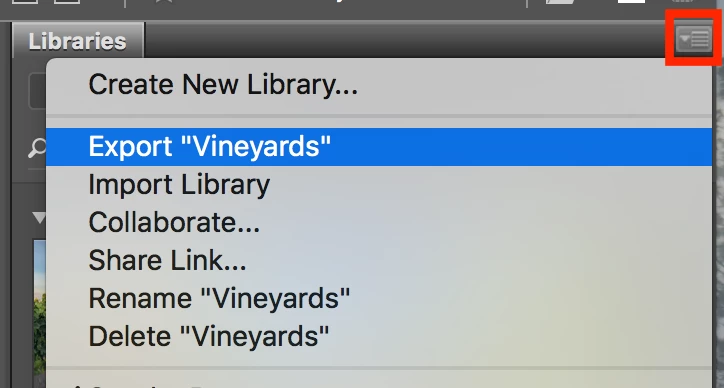
You can find the import/export from the context menu of CC Libraries.

Best,

34 replies

Participant
Nov 8, 2018 8:59 PM UTC

Any similar solution for LR mobile library ?

Translate
Deepak_Gupta1
Participating Frequently
Jul 17, 2018 2:48 PM UTC

Hi All,

We have released a new update of Adobe Bridge (CC 2018) on 16 July 2018. The new version build number is 8.1.0.383. This version is available to install via Adobe Creative Cloud application.

This Bridge update contains support for CC Libraries. Please check the "Libraries" workspace after installing new version of Bridge CC.

You may need to update the Creative Cloud application and restart your computer to see the updated installer.

Thanks,

Deepak Gupta

Translate
Participant
Jul 25, 2018 9:24 AM UTC

This seems to have the same functions, I cannot see anything to transfer ownership, only collaborate?

Translate
Participant
Mar 28, 2018 6:05 PM UTC

To Everyone,

The real issue here is what happens to the many many links that exists in many documents when you share and copy a CCLibrary owned by USER1 to USER2's account in order to transfer ownership. Even if USER2 copies over the latest and greatest version of USER1's CCLibrary, all of the links in the documents will go missing and have to be relinked if USER1's account is terminated.

In my case, this would be at least 2000 links that will go missing in this transfer of ownership because the assets in my files link to USER1's CCLibrary not USER2's.

Translate
Participant
Jul 10, 2015 5:55 PM UTC

I have the same question. Can ownership of a library be transfer to another users? We're moving our current CC account to a different one. This will probably delete the library on the old account unless we can find a way to move it over.

Thanks

Translate
Ken G. Rice
Participating Frequently
Jul 10, 2015 6:03 PM UTC

From the Assets site at https://assets.adobe.com you can use Send Link and Save To Creative Cloud to copy an entire Library over to a different account.

Translate
Participant
Jul 10, 2015 8:09 PM UTC

Hi Ken,

Thank you for the message. I know you can share and collaborate library but what would happen if the account was deleted where the library was create?

Thanks

Translate
deto_ws
Inspiring
Mar 12, 2015 2:58 AM UTC

hi shumway,

you can use share option : https://helpx.adobe.com/creative-cloud/help/collaboration.html#collaborate_libraries

i hope can help

regards

Translate