
Known Participant
June 17, 2022
Question

appli bureau cloud prend la main sur bureau windows

  • June 17, 2022
  • 1 reply
  • 407 views

Bonjour,

Je ne comprends pas pourquoi ce que j'enregistre depuis peu sur mon bureau va directement dans le Cloud Adobe. Les fichiers mis sur le bureau de mon ordi ont désormais une encoche verte 
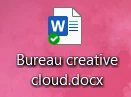
Comment désactiver cette fonction SVP. 

Quelle manip j'ai pu faire pour me retrouver dans ce bazar ?

Merci

This topic has been closed for replies.

1 reply

Tarun Saini
Community Manager
Community Manager
June 17, 2022

Hi there,


Thanks for reaching out. Creative Cloud doesn't sync files which are stored on the desktop. When you move files in the local Creative Cloud Files folder and the Creative Cloud desktop app is running, the files automatically sync to Creative Cloud.


The green checkmark on your desktop icon indicates that Microsoft's OneDrive has successfully backed up your file to the cloud. This checkmark that appears on your pc might sync the file to your OneDrive account. All files and folders that you have chosen to backup in your cloud are marked with a green checkmark.


Let us know if you need further assistance.


Regards,

Tarun

Liz5C71Author
Known Participant
June 26, 2022

Bonjour,

Merci d'avoir pris le temps de me répondre.

Il s'agit bien du cloud Adobe et non de one drive.

Il m'a fallu supprimer du cloud Adobe, tous les fichiers qui étaient sur mon bureau.

Comment faire pour que cela cesse ?

Merci pour votre aide.

Tarun Saini
Community Manager
Community Manager
June 28, 2022

Thanks for your response. Are you referring to the Creative Cloud Folder which is installed locally on your device or when you move any file to the Creative Cloud files folder it goes to the cloud? We're here to help, just need some info.


Regards,

Tarun