


Inspiring
May 26, 2023
Answered

At assets.adobe.com, "Locate" now just opens the file

  • May 26, 2023
  • 2 replies
  • 841 views

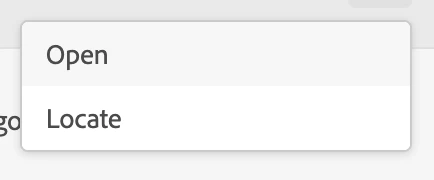
At assets.adobe.com/files, clicking on "Locate" used to open the folder that the file is found in. Now, it just opens the file in the browser, which "Open" already does. And from the opened file screen, there doesn't seem to be a way to determine the file's folder. In many if not most instances, I actually need to open the folder containing the file, not the file itself. I don't understand why Adobe would duplicate the feature of "Open" and remove the very critical feature of being able to open the containing folder from this menu. Was this a mistake? Please add it back. It's a source of massive slowdown in productivity.
This topic has been closed for replies.
Correct answer tcdigitalmarketing

you're welcome.


It seems this bug is now fixed.

2 replies

kglad
Community Expert
Community Expert
May 26, 2023

what are you doing to reveal that locate option

Inspiring
May 26, 2023

The menu with "Open" and "Locate" appears when you click on "..." on a search result when searching for a file or folder at assets.adobe.com/files. As of yesterday, both "Open" and "Locate" do the same thing: open the file within the browser. "Locate" used to open the folder that the file is contained in, which is a critical feature and needs to return.

kglad
Community Expert
Community Expert
May 27, 2023

@tcdigitalmarketing 


thank you for that info.   i never used that before but today i see the same thing as you with both "open" and "locate" doing the same thing.


these are user-to-user forums to make an adobe suggestion:


for applicable apps, you can make (some) suggestions to adobe here, https://helpx.adobe.com/ie/x-productkb/global/how-to-user-voice.html


for others, use https://www.adobe.com/products/wishform.html

Tarun Saini
Community Manager
Community Manager
May 26, 2023

Hi @tcdigitalmarketing,


We're sorry to hear about your difficulties. Could you please tell us which file you're trying to open? Please share the navigation steps as to how you're trying to open the file. Are you trying to open the file from www.assets.adobe.com,and then you would like to know which file is stored in the folder which is stored locally?


We're here to help, just need some info.


Regards,

Tarun

Inspiring
May 26, 2023

Hi, not trying to open a file, trying to open the folder of the file. Until yesterday, clicking "Locate" opened the folder, but now it opens the file instead, which is the same thing "Open" already does. This is very counterintuitive and time-wasting. Please escalate my feedback to the development team to fix this.