
Bug: Issues with Adobe Spark web Interface when creating multiple branded templates
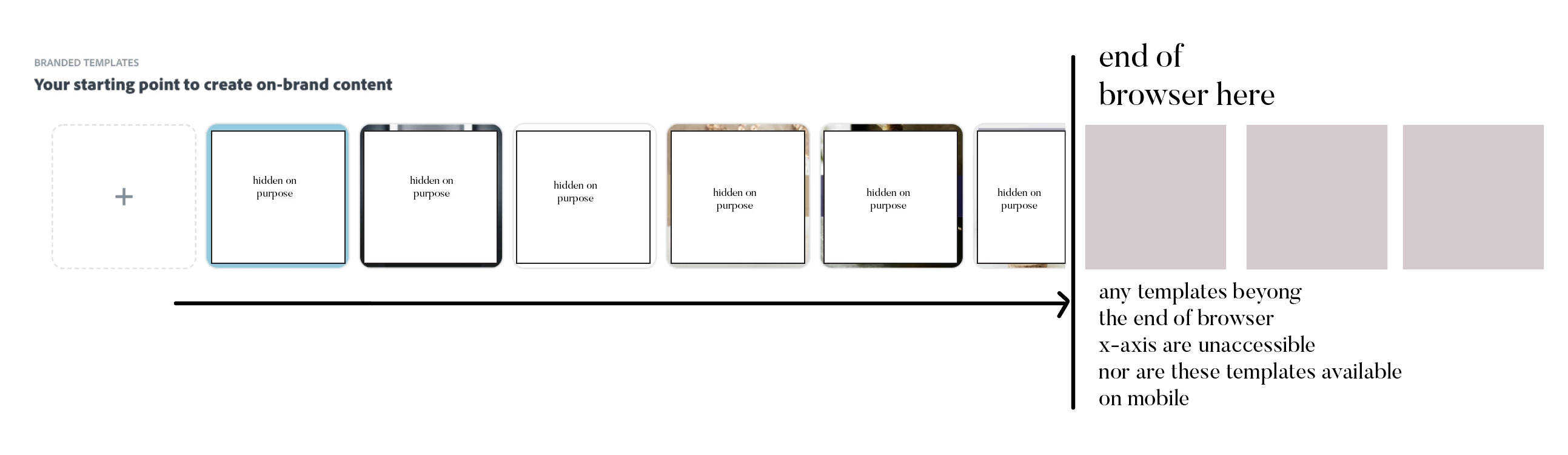
When you create a brand in Adobe Spark and create multiple branded templates under 'Brand Templates', the web interface doesn't support scroll and the templates become unaccessible beyond the x-axis of the browser.
We need the web development team to enable scrolling on the <div> or have the <div> contents wrap in the browser.
Please have the development team recreate this bug my creating multiple templates under the following page: https://spark.adobe.com/sp/branding/
Then add the following code "overflow-x: auto;" to enable scrolling.
<div role="rowgroup" style="position: absolute; transform: translate3d(0px, 0px, 0px); width: 1424px; height: 250px; pointer-events: auto; overflow-x: auto;" class="">
We also need to be able to access these branded templates in the iOS app. This feature is currently unavailable and I'm not sure why.


 AdChoices