

BUG REPORT: Creative Cloud forcefully boots up with red exclamation mark and no explanations
I have the app set to NOT boot up on login and that's worked for years.
Then about 2 weeks ago it has begun forcefully booting up showing a red dot with an exclamation mark as shown in the attached image here: 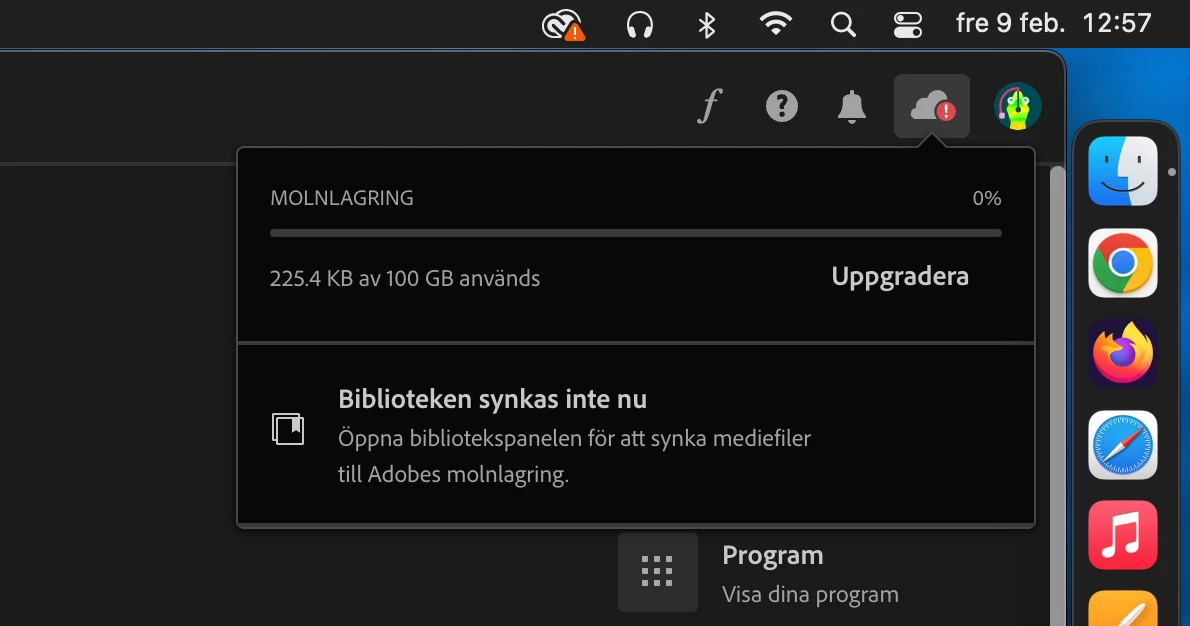
Opening the app it shows the red dot with an exclamation mark on the cloud storage, but clicking it doesn't show me what's wrong.
There's no errors, no error messages, there's no prompt appearing to ask me to do something.
I have refreshed the app, rebooted, tried all the options I found online.
Checked the settings again.
I don't get what's wrong and the app itself isn't telling me what's wrong.
The cloud storage isn't full, it's not even being used.
Please Adobe.... just fix your app.
I'm on Mac OS Monterey 12.7.1.
On an Imac Pro (2017).


 AdChoices