
Answered
Can sign in to adobe creative cloud windows 11
I am at a lost here, all of a sudden i cant log into my creative cloud on the desktop or online, in any browser. I get this error "{"error":"invalid_scope"}" Can you help?

I am at a lost here, all of a sudden i cant log into my creative cloud on the desktop or online, in any browser. I get this error "{"error":"invalid_scope"}" Can you help?
I figured it out and i would like to share it,
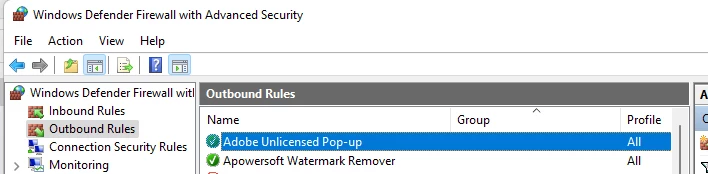
The issue was the firewall settings, for some unknown reason my "Adobe Unlicence Pop-Up" was turned off, I am amazed that the adobe tech who had remote access to my computer could not figure this out.. So here is the setting I changed and everything came back to life.
That did it for me,
Already have an account? Login
Enter your E-mail address. We'll send you an e-mail with instructions to reset your password.


 AdChoices