

precise_scientist98A2
Participant
November 25, 2016
Question

Can't locate linked assets in CC Libraries
  • November 25, 2016
  • 1 reply
  • 1766 views

I usually use libraries for my project. Recently I had updated to Adobe CC 2017 and I have some trouble.

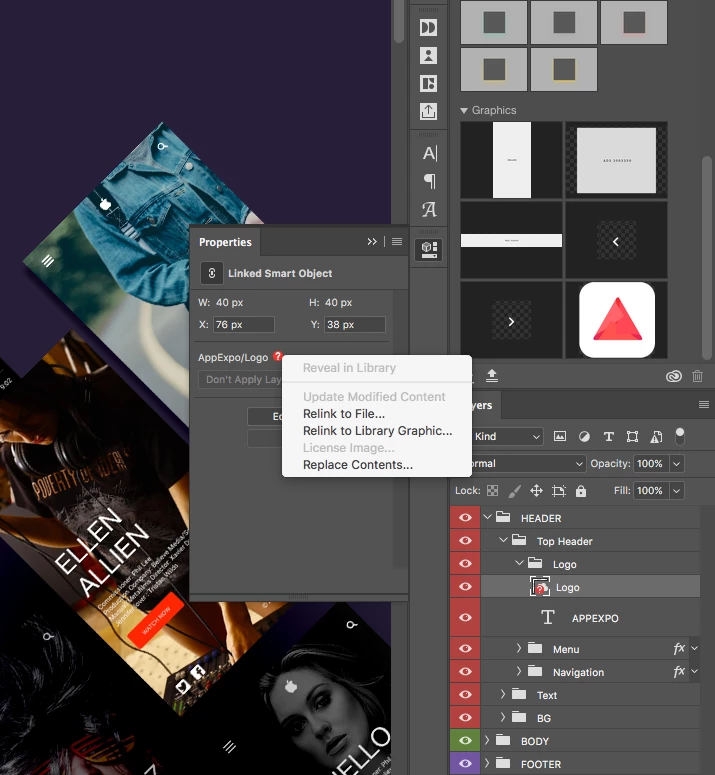
I opened my project from an older version; it seems that the assets used in the libraries I have lost the link. I was trying to link all of missing object to the libraries again but then lost it. I can not do the duplicated layer group or crop my design. You can see I've with libraries and it continues to fail when I duplicate the layer.

I have never seen this error on the previous version. Many of my friends are also experiencing this error. We wish Adobe fix this as soon as possible. Thank you!

This topic has been closed for replies.

1 reply

David__B
Adobe Employee
Adobe Employee
January 12, 2017

Hi Leo,

Sorry for the late reply. A few additional questions around this.

  • Is this within Photoshop CC2017?
  • And just to confirm I understand, the linking to the asset seemed to get broken when updating from Photoshop CC2015 to Photoshop CC2017?
  • Did you uninstall PS CC2015 when you installed CC2017?
  • Does the logo asset still appear here? Adobe Creative Cloud
  • If you create a new document and add the logo asset from the library panel again does that work?

Thanks,

- Dave

precise_scientist98A2
Participant
January 14, 2017

Hi David,

  • Well, that's the photoshop 2017
  • I tried to remove and install completely new photoshop
  • I've created a new asset retry the library, and it is operating normally until off software and reopen it again lost connections. I had to double-click the layer that links back to the library and open it to fix asset. Amazingly after I have a little changed and saved, it has been normal operation.
  • Btw, I am using the trial version of the software

Best,
Leo Lion

David__B
Adobe Employee
Adobe Employee
February 2, 2017

Thanks for the update Leo,

Glad to hear its working now!