


Can't seem to get auto-update to work
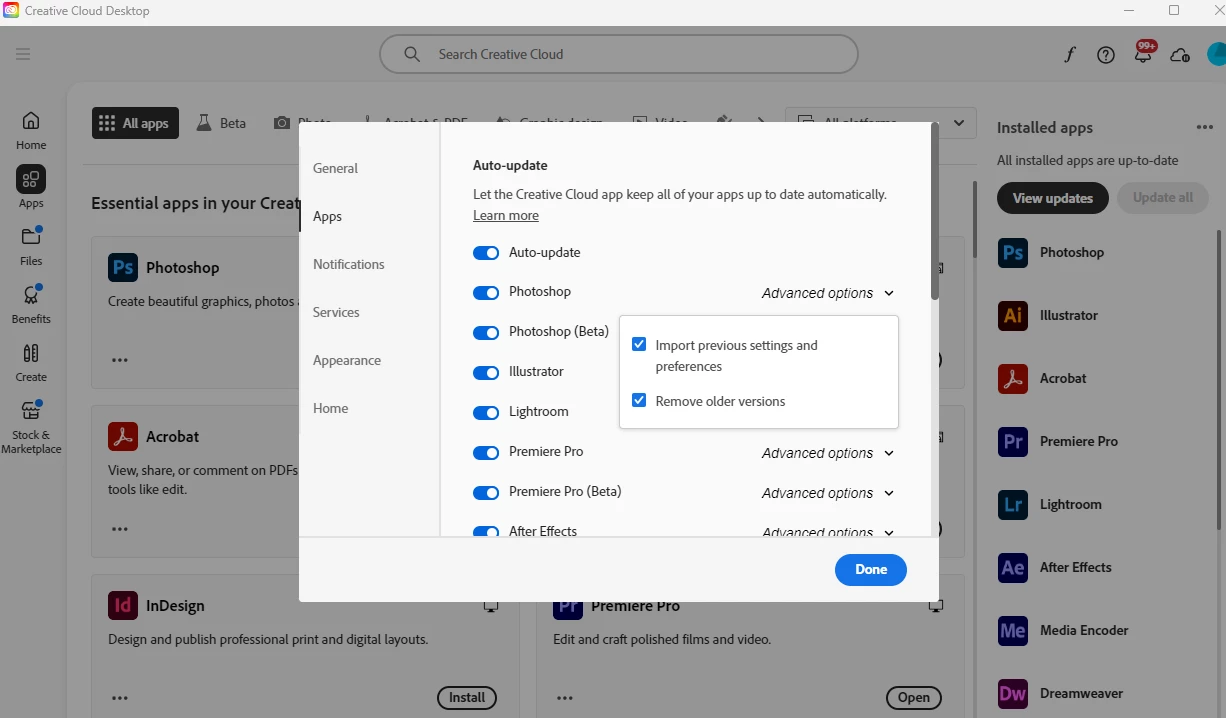
I've gone into my settings and turned on auto-update. I've set both of the check boxes for applications to be checked, but still it doesn't auto-update. Instead, while I use Photoshop Beta, I get messages telling me that there's a newer version I can download when I close the app. I've ended up adding CC to my start up so that, when I boot, I'm at least told what apps need updating and I can bang that out before opening them. But I just want things to autoupdate when I'm not using them. What could I be missing here? Working on Win11 Home and not SUPER techy, so be gentle with your techy responses. 🙂
This has nothing to do with Collaboration, but it wouldn't let me post unless I picked one of four topics that this has nothing to do with any of them. lol. If I'm posting this in the wrong place, please advise on that as well but this sounded like the best fit.
 AdChoices