



rachelcenter
Legend
March 16, 2026
Answered

Can you update creative cloud to fix the following?

  • March 16, 2026
  • 2 replies
  • 62 views

3 problems to report:
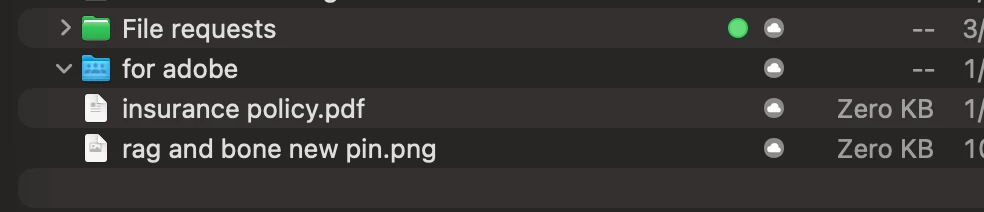
1) Ever since I updated creative cloud a few weeks ago, now the dropbox desktop icons (for dropbox desktop app) have disappeared. And I went over it with dropbox and they instructed me to go to System settings on mac → general → Login Items & Extensions, and scroll all the way down to the “extensions” section and find where its says “creative cloud” and hit the circle i icon, and toggle on and off “file provider” then my dropbox desktop app sync icons come back. Dropback says creative cloud is notorious for hyjacking desktop icons. I must note this fix is temporary and resurfaces later. I’ve provided a screenshot below of what the dropbox desktop app sync icons look like. 
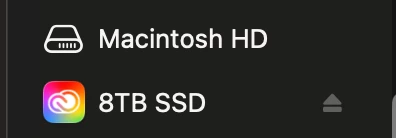
2) Ever since I updated creative cloud a few weeks ago, my external hard drives on the left hand panel are defaulting to the creative cloud app. 

3)the authenticator app on firefox. when im on firefox it asks me to type in a number but doesnt give me a box to type it in. but when I go to safari it shows me a number on screen and thats the number I choose on my autheticator. Can you look into the firefox issue?
 

    Correct answer Ruchika28549622z4gt

    We are aware of an issue where Finder Sidebar icons for SSDs display incorrect icons, a behavior also observed in other macOS applications using Finder Sync extensions.

    This issue is seen only on macOS Tahoe systems. We have raised this with Apple and, based on their recommendation, implemented a temporary workaround. The roll-out is currently in progress and the issue should be resolved soon.

    Please note that this is not a Creative Cloudspecific issue, but rather a macOS Tahoe specific behavior.

    Regards,

    Ruchika Wadhawan

    2 replies

    Ruchika28549622z4gtCorrect answer
    Adobe Employee
    March 19, 2026

    We are aware of an issue where Finder Sidebar icons for SSDs display incorrect icons, a behavior also observed in other macOS applications using Finder Sync extensions.

    This issue is seen only on macOS Tahoe systems. We have raised this with Apple and, based on their recommendation, implemented a temporary workaround. The roll-out is currently in progress and the issue should be resolved soon.

    Please note that this is not a Creative Cloudspecific issue, but rather a macOS Tahoe specific behavior.

    Regards,

    Ruchika Wadhawan

    kglad
    Community Expert
    Community Expert
    March 17, 2026

    you can try posting this in the cc desktop bugs or suggestions section.