
Participant
July 25, 2018
Question

Cannot add any assets to CC Libraries sometimes. Plus button greyed out.

  • July 25, 2018
  • 5 replies
  • 4764 views

I have occasionally faced this issue where I cannot add any assets to my CC libraries panel in either Illustrator, Photoshop, or InDesign. I can't find any forums that point to this exactly and have tried varies things like closing all Adobe programs, signing in and out of Creative Cloud, refreshing all CC process and such to no avail. 
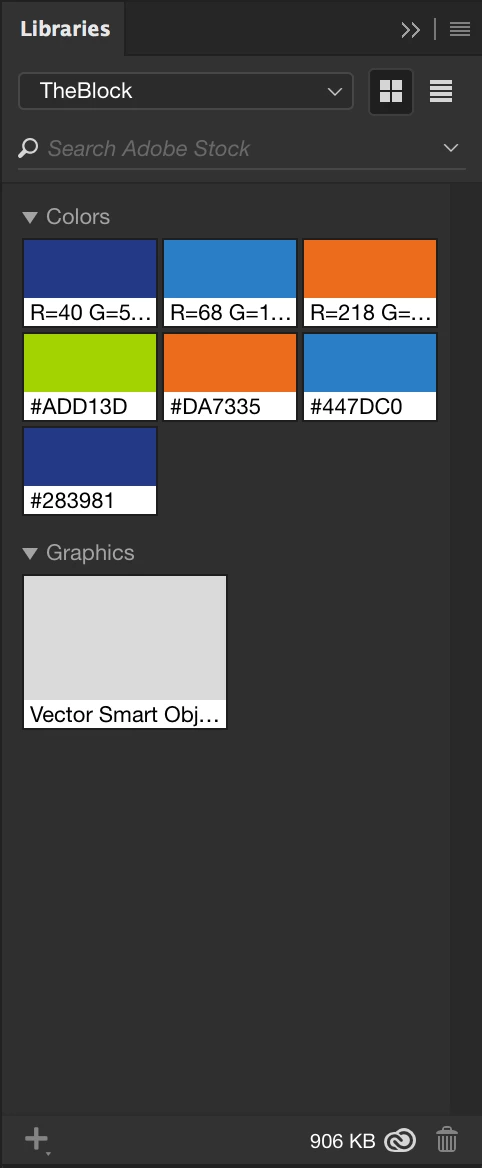
As you can see, the plus 'Add Content' button is greyed out regardless of any artwork being selected. Even when a shape is selected and I click any of these colours in my library, nothing happens.

This topic has been closed for replies.

5 replies

Participant
March 25, 2024

I also run into this pretty regularly. The only way I've found I can add stuff is through the Creative Cloud app. I can rarely add anything from the apps themselves which makes it very difficult to save things like lower thirds I've created IN the app. Incredibly frustrating.

Tarun Saini
Community Manager
Community Manager
March 26, 2024

Hi 

@Jesse29059101zpuq

,


We're sorry to hear about this. Could you please let us know more about the issue you're seeing? How are you trying to add assets to your libraries? Did you get any error while doing that? 


Please check this article and try the steps mentioned in it and let us know if that helps- https://adobe.ly/3TNGOrn


Regards,

Tarun

Participant
September 11, 2023

This has been a major problem for me and there is a way to do it - can't believe no one from Adobe has explained.

Log in to Adobe Cloud on via desktop web browser  
Go to Files
Go into your Library
View by 'type'
Then add your icons

This works for me

Participant
September 11, 2023

Ok so it turns out this only works for me sporadically. I don't know why. Very frustrating.

kglad
Community Expert
Community Expert
September 11, 2023

does the problem occur when using more than one network?

Participant
July 28, 2020

Having the same problem today.

Participating Frequently
August 13, 2020

same here on new PC, must be a bug

Participant
August 19, 2020

I thought it was just me. My add content click is grayed out in Premiere Pro 2020. Uninstalled and reinstalled. Repaired Creative Cloud. Nothing. I am opening old projects and copy pasting. This is ridiculous! This post is originally from 2018!!! For what we pay for this sub this should be working reliably by now.

Participant
January 17, 2020

Anyone got a fix for this? I tried to add even on different days, nothing...

mikes54260262
Participant
January 23, 2020

Wondering the same. Sometimes I can add/use/organize assets. Sometimes I can only use/organize but not add. Sometimes I can't use/add but I can organize (add folders). I experience this at work but don't have any issues at home. Our extremenly competent Tech staff does not know why and has said  he thinks "CC Libraries must not work well with networks" which I find odd as any changes I do at home are reflected at work. Adobe - Please HELP!

Thanks.

Participant
July 25, 2018

The only fix I have found that sometimes works is restarting my mac, but I don't want to have to do that every time I open any Adobe software.

LaurieOwens
Participant
September 4, 2018

same issue here...