
Participating Frequently
May 29, 2014
Question

CC Files Syncing problem

  • May 29, 2014
  • 1 reply
  • 599 views

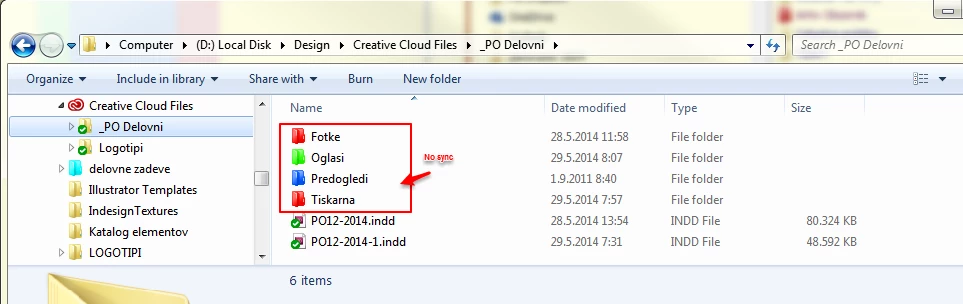
In Creative Cloud Files folder I've moved my working folder, and "logo" folder with several subfolders. Logo folder has sync OK, but my working folder (_PO Delovni) only two Indesign files are sync. Other subfolders with jpg, ai, tiff and pdf files not.

Creative Cloud Files - _PO Delovni - Fotke (no sync)

                                                   - Oglasi (no sync)

                                                   - Predogledi (no sync)

                                                    - Tiskarna (no sync)

                                                   indd file1, indd file 2 (sync)

                               - Logotipi (sync)


Any suggestions?
This topic has been closed for replies.

1 reply

Participating Frequently
June 27, 2014

Hi Mirtma65,

Is the Creative Cloud desktop application reporting an error? When you add a file to "Fotke" (for example), do you get a message telling you that the file could not be synced?

To help us to investigate this further, please follow these steps:

1. Press the 'Windows' key to bring up your Start menu.

2. In the text field at the bottom, copy and paste this then press enter: %APPDATA%\Adobe

3. Right-click the CoreSync folder, and choose 'Send to...' > 'Zip'.

4. Email the zipped folder to me at bmordue@adobe.com.

Thank you,

Ben

Mirtma65Author
Participating Frequently
June 27, 2014

Thank you for taking your time. I don't know why those folders wasn't synchronised, but when I've created new folders with different names it was OK. I've stopped using CC files sync that way anyway. It would be good to have more options about synchronising to cloud: sync only to cloud, sync both ways, never replace local files, etc...