
Participant
May 14, 2017
Question

CC Libraries — File does not exist / is in use / don't have access — Problem

  • May 14, 2017
  • 2 replies
  • 477 views

Just today i received the problem that i wanted to pull an .ai file from the libraries into an InDesign document and it gives me this error message (german, sorry)

"File does not exist / is in use / don't have access"
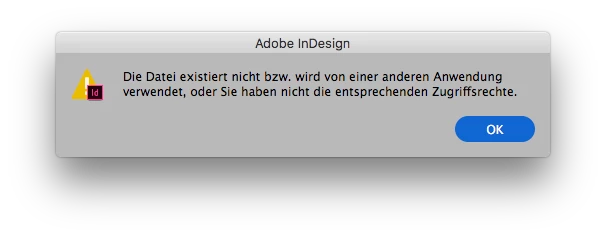
The file is neither of the mentioned issues. I even can open and edit it in Illustrator and view it on the website library.

Also, InDesign suddenly tells me that certain library files, already used in other documents, do not exist anymore when i open the document.

What can we do?

Cheers

This topic has been closed for replies.

2 replies

David__B
Adobe Employee
Adobe Employee
May 19, 2017

Hi Andreas,

I had a few questions and was wondering if you could do some comparative testing regarding this issue. Could you try these or provide more info?

- Do you get the error regardless of which InDesign document you attempt to add it to? If you attempt to drag it into a newly created InDesign document do you get the same error?

- Does having Illustrator closed at the time when trying to drag it into InDesign make any difference?

- Could you create a new library, add the Ai file to the new library, then attempt to drag this version into an InDesign doc again. Does the error occur in this case too?

- Does it occur for all Illustrator files added to the library or just specific ones?

- Are the Libraries which this is occurring one's which are collaborated with others?

Please get back to me when you get the chance.

Cheers,

- Dave

kglad
Community Expert
Community Expert
May 14, 2017