


Participant
February 4, 2020
Answered

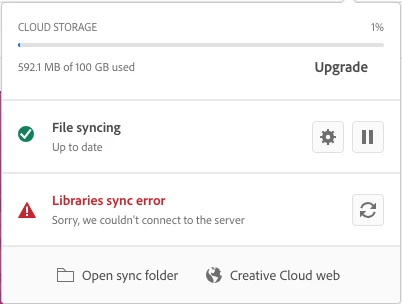
CC Libraries Sync Error

  • February 4, 2020
  • 23 replies
  • 82403 views

Hi,

I can not access the CC Libraries across my adobe applications because the error message keeps saying it cannot connect to the server. Please see attached screensot:

I have followed the advice and signed-out and signed-in back in Adobe Creative Cloud Desktop App yet the same issue is not being resolved. Help please! 🙂 
Correct answer kglad

I have the same problem but so many Senior thechnical Support when into my computer and NEVER solve the problem.So the not only it is recuring all the time sync error but NOW i have to put my paswword everytime the screen goes off :  


reset the cc desktop app by making sure it's in the foreground, then press:

Win: Ctrl + Alt + R
Mac: Cmd + Opt + R


if that fails, repair per https://helpx.adobe.com/download-install/kb/creative-cloud-install-stuck.html


if that fails, uninstall using the correct uninstaller from https://helpx.adobe.com/creative-cloud/help/uninstall-creative-cloud-desktop-app.html#sa_src=web-messaging and then reinstall using*


if that fails, do a clean cc install carefully following each applicable step:

uninstall every cc app including preferences per https://helpx.adobe.com/creative-cloud/help/uninstall-remove-app.html

then uninstall the cc desktop app, again using the correct uninstaller per https://helpx.adobe.com/creative-cloud/help/uninstall-creative-cloud-desktop-app.html#sa_src=web-messaging

clean your computer of cc files per http://www.adobe.com/support/contact/cscleanertool.html

check for, and if available, update your os

if windows is your os, repair all ms visual c++ versions that can be repaired (use google if you don't know how to do this)

if windows is your os update your ms visual c++, if it can be updated (use google if you don't know how to do this)

restart your computer (don't skip this)

reinstall the cc desktop app using the "alternative download links" at the bottom of the page at https://helpx.adobe.com/download-install/kb/creative-cloud-desktop-app-download.html

use the desktop app to install your cc programs/trials

NOTE: win 11 users that have trouble with the latest win 10 installer often have success with the older win 10 installer.

23 replies

thompsonryan
Inspiring
September 24, 2021

I am seeing the same "Libraries sync error" error message in creative cloud app however the message under the red alert text reads "Sorry, your libraries didn't sync". 

I'm still able to access my libraries and create and share new ones but the alert message hasn't gone away.


I've run through the steps outlined in this discussion with no luck resolving the error. I've thankfully been able to ignore it but I'm concerned if my libraries aren't actually correct anymore.


Participant
July 22, 2021

Hello! I've got CC Libraries Sync Error... I logged out, deleted all folders that start with “CC_LIBRARIES_PANEL_EXTENSION_xx_xx_xx” in C:\Program Files\Common Files\Adobe\CEP\extensions, quit all Adobe related products, killed the CCLibraries and Adobe related processes in Task Manager, used Creative Cloud Cleaner tool, and then downloaded the CC again but the error is still there (((

Participant
August 23, 2021

I am having this same problem too, on Windows.


Over the weekend I uninstalled all the Adobe apps and deleted all the synced files, did the Adobe cleaner steps and then resynced my files and reinstalled the latest apps, and I'm still getting the 'Libraries Sync Error' message.


Please can someone tell me how to find a way to contact tech support? I've been looking around on the help pages and whilst they say that you can contact by phone or email I can't actually find a phone number or email address to contact.

dkdupey17
Participating Frequently
August 23, 2021

If you are signed into your Adobe account, go to:

Adobe.com > Help & Support tab > Blue Contact Us button

I chatted with an online support agent for almost 5 hours to get this issue resolved. They had to remotely take over my computer and messed around with a lot of settings to fix it.

Known Participant
July 15, 2021

Hi 


I ahve this same issue, I followed the instructions but I dont have any folderes  called "CC_LIBRARIES_PANEL_EXTENSION_xx_xx_xx”

This quite serious problem for us at th emoment and is going on a long time, I ahve tried all the Adobe removl and clean tool, reinstalled CC and XD and the issue still persists.

Thanks

Gavin

Known Participant
July 15, 2021

I am on  a VM behind a firewall, I can save and open files in the cloud, but cant publish

Participant
January 30, 2021

Worked perfectly thanks! 

Participant
July 28, 2020

Hi,


I am also having the same issue and I completed all the steps but nothing has been resolved. Can you please help?


Thank you,

Kelsey

Inspiring
July 28, 2020

Like I said above - I finally got the issue resolved, I had to contact Adobe Tech Support Team, their senior members.  It turned out that when I had older versions of PS, LR, PSE, when I upgraded, there were residual files that the Senior tech support team member had to remove, it took him about an hour to finally resolve.  So I would get with Adobe Support and ask to be connected to a Senior Support Team member.  Not sure if you have had prior versions and when installed not all of the old files were removed. Hope this helps.....


So I would call Adobe Tech support and ask to talk to a senior team member.

Participant
July 12, 2020

Hello, I am not able to open Adobe Lightroom CC. I am running a 2017 Macbook Pro MacOS 15.5.5. 8Gb RAM. I have followed all the steps and have had no luck. I can log into Creative Cloud app and have the libraries syn error. In Lightroom i have "can't connect to the server" error. It is very frustrating.  

Inspiring
July 13, 2020

I finally got the issue resolved, I had to contact Adobe Tech Support Team, their senior members.  It turned out that when I had older versions of PS, LR, PSE, when I upgraded, there were residual files that the Senior tech support team member had to remove, it took him about an hour to finally resolve.  So I would get with Adobe Support and ask to be connected to a Senior Support Team member.  Not sure if you have had prior versions and when installed not all of the old files were removed. Hope this helps.....

Inspiring
June 25, 2020

I am on an iMac running 10.15.5 and I have the latest version of CC and Adobe Aps through a subscription.

I have the same issue, I have uninstalled CC and all the Adobe apps, no luck,

I deleted all Folder with "CC_Lib......_xx..." in my root HD library folder as asked

I then installed and used the Cleaner mentioned and cleaned ALL,

I then went back to verify that all he "CC_Libraries...." were still gone, they were

I then manually installed CC libraries

I started CC and PS

the second photo show that i am still getting the same issue.


Here is a piece of information that might help -

my Adobe.com and CC ID is (removed for privacy)

However, when I go to sign into Adobe.com or CC I see not only the above address that is associated with the website I SEE THE FOLLOWING:

adobeid-na1.services.adobe.com WHICH HAS THE FOLLOWING EMAIL ADDRESS ASSOCIATED WITH IT:


(removed for privacy) 


i assume that adobeid.services.adobe.com is where my adobe.com/CC credentials are stored and since the email address associated with signing into adobe.com / CC is different from the email address associated with adobeid.services.adobe.com.  Could this be the issue, i have also uploaded the Adobe Logs here is the body of the email i got


Dear User,

The following file has been uploaded on Adobe LogCollector Portal:

File: AdobeLogs_20200625_093033_189-mac.zip

Please use the above filename as a reference when contacting Adobe Customer Care.

Thank you,


The Log Collector Tool team


I then went to see that they were installed correctly and they were see below 

Participant
June 23, 2020

I have tried this and several other things including a fresh install of all Adobe software. I still can't connect to the sever.

SilvaBravo Audiovisual
Participant
May 30, 2020

Hello.


I Try to do this steps, but don't work the CC Library.


Can you help me, please?

Adobe Employee
May 30, 2020

I sent you a message.


Participant
May 5, 2020

Hello, 


I have tried all the steps, but it still doesn't work. can you please help? 

Adobe Employee
May 5, 2020

Hi,

We would like to investigate this problem and if you could share logs from your machine, this would be very helpful. Here is a link to Adobe Log Collector Tool:
https://helpx.adobe.com/creative-cloud/kb/cc-log-collector.html
You'll get a zip file generated, could you please send the name of it?
It will be something like "AdobeLogs_20191011_081024_xxx-win.zip"
This might help us to understand the root cause of the problem.

Thank you,

Supriya Katiyar
CCLibraries

Participant
May 18, 2020

Hi there - same problem for me too, have tried all the solutions but no joy...
