amrhMeera
Participant
September 9, 2020
Question

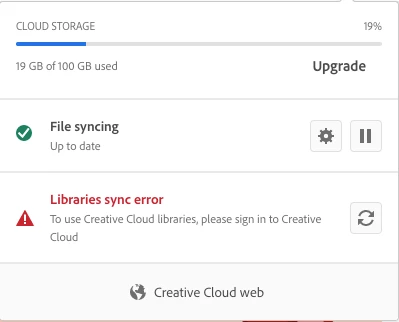
CC libraries sync error "please log in "

  • September 9, 2020
  • 2 replies
  • 660 views


I have not been able to access my CC library from the CC Desk app or from any Adobe Application for about 3-4 weeks now. I have tried:

restarting my mac,

uninstalling and reinstalling CC desk app,

logging out and logging in,

updating the app,

removing and reinstating the CC library folder,

all of the listed trouble shooting steps, and still nothing. 


If anyone has solutions or at least an answer as to why this is happening please let me know as soon as possible. I am a 8 year Adobe client. I use Adobe for business purposes.

This topic has been closed for replies.

2 replies

David__B
Adobe Employee
Adobe Employee
September 11, 2020

Hi AmrhMeera,


I'd also recommend going through these articles if you haven't already (in the order listed)
https://helpx.adobe.com/creative-cloud/kb/creative-cloud-libraries-panel-doesn-t-load-in-desktop-products.html
https://helpx.adobe.com/creative-cloud/kb/libraries-panel-not-working.html

Hope that helps,
- Dave

amrhMeera
amrhMeeraAuthor
Participant
September 11, 2020

Thank you! Unfortunately none of the steps have produced any positive results. 

kglad
Community Expert
Community Expert
September 12, 2020

what exactly did you do that failed to solve the problem?

kglad
Community Expert
Community Expert
September 9, 2020

you may have a corrupt file it's trying to sync.


to test, check your cc cloud files (on the adobe site, including lightroom and spark) to make sure you have all of them on your computer.  (copy to a folder that's not sync'd, just in case everything goes wrong.)


if you do, change your sync folder (to an empty one) and delete all your cc cloud files (including lightroom and spark files).


restart your computer and see if there's still a sync error when trying to sync empty cc adobe files with an empty local folder.

amrhMeera
amrhMeeraAuthor
Participant
September 9, 2020

Thank you, how do I change my sync folder to an empty one? Create a new folder and move all my files to that one? 

kglad
Community Expert
Community Expert
September 10, 2020

create an empty folder and change it to your sync folder: