Matthon
Participant
November 9, 2019
Question

CC library 2020 process “node” high CPU usage

  • November 9, 2019
  • 2 replies
  • 7242 views

Hello,

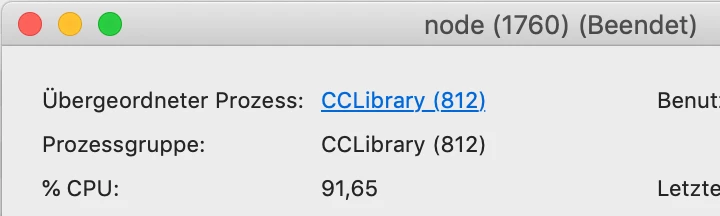
maybe this happens since updating to the new cc 2020, I cannot say clearly: The fans of my MacBook Pro 2015 (i7, 16 GB RAM) are working on a high and loud level always. This is caused by the process “node” which belongs to CC-library. My os: macOS 10.14.4.


As I uninstalled the cc desktop app, everything was fine and the fans ran at a normal low level. Since I installed cc app again, everything is like before and the fans are working loud again.


Does anybody know some answer?


Best, Matthias

This topic has been closed for replies.

2 replies

Adobe Employee
November 12, 2019

Hi Matthias,

Process “node” uses lot of cpu only initially when libraries trying to sync data to your local machine. Your machine's cpu will come back to its normal state once everything is in sync.  If you think, the problem persists after enough time, can you please try rebooting your machine and see CPU usage.


If the problem persists still after enough time, can you please gives us logs to investigate further. Please follow the steps at

https://helpx.adobe.com/creative-cloud/kb/cc-log-collector.html and provide us the zip file name.


-- Gambhir

Matthon
MatthonAuthor
Participant
November 15, 2019

Hi Gambhir,


thanks for your replay. I did some tests on 2 computers: when I upload a file from my office-pc (windows 10) to the adobe cloud my mac book reacts immediately and the fans become louder. Funny, I never realized that before.


But: Even when I’m not working on the mac, when no adobe program is running and even when I pause the Adobe Cloud sync: The fans are running too high and node-process always shows 83–93% CPU.


I even believe that something prevents the standby. When I close the monitor nothing happens.


So I started the log-collector. The file name is: AdobeLogs_20191115_172047_622-mac.zxp


Best, Matthias

Adobe Employee
November 19, 2019

Hi Matthias,

Unfortunately, we could not find the logs that you attached in our database.

One of our support person will contact you to collect logs.


Thanks for your patience.

-- Gambhir

Participant
November 10, 2019

Hello


After upgrading Lightroom from 8.4 to 9 I observed that the CPU load was 100% after starting LR and working with the program.

In worst case this results in a blue screen.

Did anybody make the same observation and perhaps has a solution?

Regards

Guenter