
Participant
July 29, 2021
Answered

CC Library - Adding Description in the app

  • July 29, 2021
  • 1 reply
  • 375 views

So I know you can add an edit a description for a CC library asset when in a program such as Bridge or InDesign. That functionality doesn't seem to be in the "Your Libraries" section in the CC app.


Am I missing something? Is this something that will get added? It would be super useful for some asset management/adding version information when using the "replace graphic" option.


Thanks!
This topic has been closed for replies.
Correct answer Mariia Novikova

Hi,

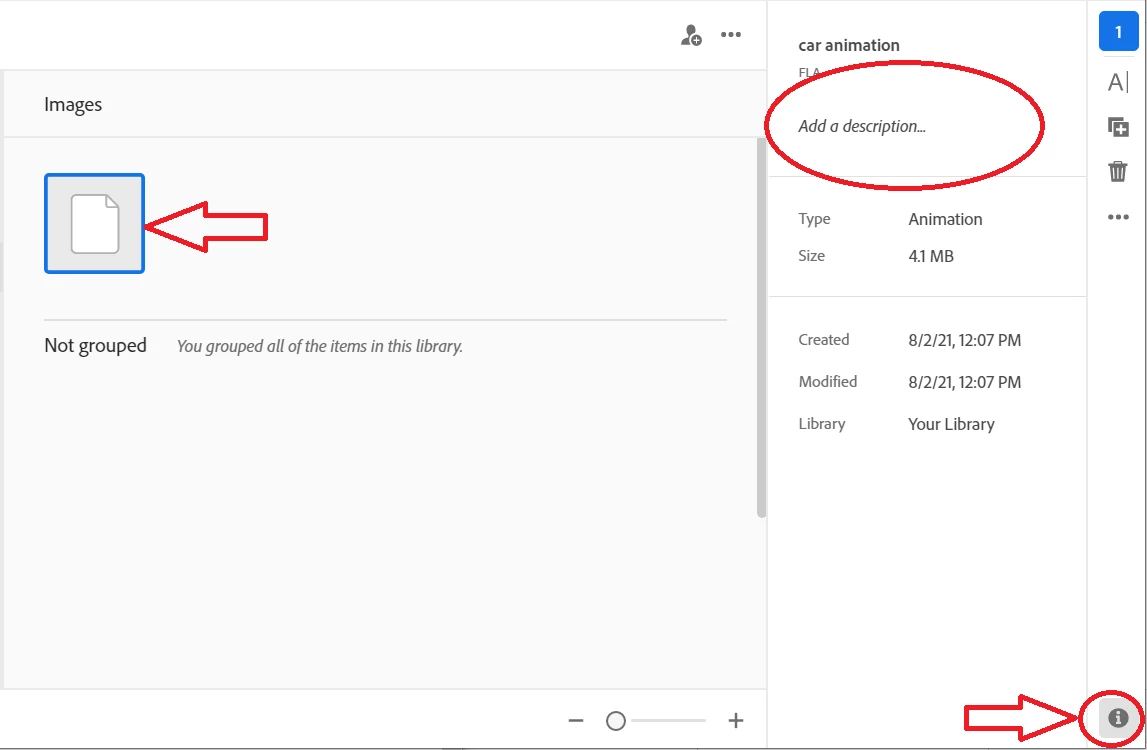
To Add / View / Edit / Delete Descripton in Creative Cloud Application, do following:
1. Select an element
2. Click "i" Info Button on the bottom of the right side bar
3. Add / Edit a description


Please, let us know if that is something you were looking for.

Thank you,
Mariia

1 reply

Mariia Novikova
Adobe Employee
Mariia NovikovaCorrect answer
Adobe Employee
August 2, 2021

Hi,

To Add / View / Edit / Delete Descripton in Creative Cloud Application, do following:
1. Select an element
2. Click "i" Info Button on the bottom of the right side bar
3. Add / Edit a description


Please, let us know if that is something you were looking for.

Thank you,
Mariia

Participant
August 2, 2021

Thank you Mariia!

That is exactly what I was looking for.