
Inspiring
April 7, 2022
Answered

CC Library previews lost when edited in CC2021 or CC2022

  • April 7, 2022
  • 3 replies
  • 1055 views

(cross-posting this from the Illustrator discussions based on the suggestion of Ton Frederiks)


Working in Windows 10 Enterprise and various CC versions of Illustrator.

As of a week or two ago, library previews of images recently edited in CC2021 and CC2022 are lost (general CC logo appears instead).

The one on the bottom is the original image. The others are edited and saved in CC2020, CC2021, and CC2022 this morning. Until a couple of weeks ago, previews of edited library images were fine.
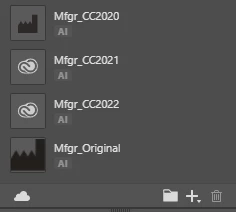


These appear similarly in the CC app:
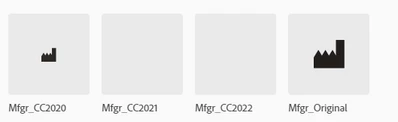


So far, I have tried the following:
- Completely uninstall a recently updated extension (same result)
- Sign in and sign out of Creative Cloud (same result)

- Completely uninstall CC2021, including prefs, reinstall, and try editing the image before making any changes to the re-installed Illustrator (same result)

- Sign out of Creative Cloud, use Task Manager to kill all CC processes, restart the computer, sign back into Creative Cloud (same result)


Note that this occurs with any library image I edit. Additionally, I just now tried adding new artwork to a library with the same result (no preview image is generated)


Since the previews are also not showing up in the CC app, even though syncing seems to be working fine. I guess these two versions of Illustrator are no longer generating a library image preview, which is reflected in the CC app.


Any other ideas on how to fix this would be appreciated.


Thanks

Correct answer mollyd619740817406769

Hello everyone, thank you for your patience as we have been working on fixing this issue. Please follow the following steps 

1. Download and install the build linked in Step 1: 

https://helpx.adobe.com/creative-cloud/kb/libraries-panel-not-working.html

2. Then remove the contents of the renditions folder at the two following locations in your file explorer:

  • %appdata%\Adobe\Creative Cloud Libraries\LIBS\<userID>\collaborated\renditions
  • %appdata%\Adobe\Creative Cloud Libraries\LIBS\<userID>\creative_cloud\renditions

3. Finally, kill CCLibrary Process from Task Manager and restart all Adobe products such Photoshop, Illustrator, etc

3 replies

mollyd619740817406769Correct answer
Adobe Employee
May 19, 2022

Hello everyone, thank you for your patience as we have been working on fixing this issue. Please follow the following steps 

1. Download and install the build linked in Step 1: 

https://helpx.adobe.com/creative-cloud/kb/libraries-panel-not-working.html

2. Then remove the contents of the renditions folder at the two following locations in your file explorer:

  • %appdata%\Adobe\Creative Cloud Libraries\LIBS\<userID>\collaborated\renditions
  • %appdata%\Adobe\Creative Cloud Libraries\LIBS\<userID>\creative_cloud\renditions

3. Finally, kill CCLibrary Process from Task Manager and restart all Adobe products such Photoshop, Illustrator, etc

Stephen_Davies
Known Participant
May 31, 2022

This has worked. Thanks for your help. 🙂 

RACNSTRAuthor
Inspiring
May 13, 2022

I have an update to the CC Libraries Preview issue.


I spoke with a couple of Adobe Engineers yesterday and we were able to figure out the cause of the problem. The engineers later got back to me saying that they had isolated the problem and that they should be able to have a fix for it within a week or two, perhaps sooner.


The problen is that Illustrator (I believe) is appending additional text following the .png file extension of the file that is used for the preview. As a workaround until the fix is available, you could go into the Creative Cloud Libraries folder under your AppData folder and simply delete all the text following ".png" in the offending file names.
Example:

In the list above, you would delete everything following "png" in the second file.


To locate, check the files in the folders under renditions in the following path:
C:\Users\<user-name>\AppData\Roaming\Adobe\Creative Cloud Libraries\LIBS\<long-string-of-random-hex-characters\creative_cloud\renditions\

Hope this helps.

Robert

RACNSTRAuthor
Inspiring
May 13, 2022

Following up on the reply above, it looks like you have to then duplicate the library object (right-click object in library > Duplicate)  to get Illustrator to refresh the preview.

Kevin Stohlmeyer
Community Expert
Community Expert
April 8, 2022

When you save your AI format file - is "Create PDF Compatible File" cheked on?

RACNSTRAuthor
Inspiring
April 8, 2022

Thank you for your response.
The short answer is Yes, it is selected.

However, I have normally been simply editing copies of libary .ai file images that were created by somebody else. but I'm sure that person also has PDF Compatibility selected, since that is an essential part of our workflow. Additionally, I didn't have any preview problems when I edited these very images 2 weeks ago.


Yesterday I also tested this in CC2021 on a newly created file (with PDF Compatibility selected) and no preview image was generated for that file. Note that previews are still generated when I edit a library image in CC2020.


Thanks again.

Robert

Stephen_Davies
Known Participant
May 4, 2022

Hi,

Did you find a resolution for this issue? Seems to be happening to lots of people.


Stephen