
Known Participant
September 27, 2017
Answered

CC never stops (or starts?) Syncing

  • September 27, 2017
  • 2 replies
  • 1199 views

TLDR;

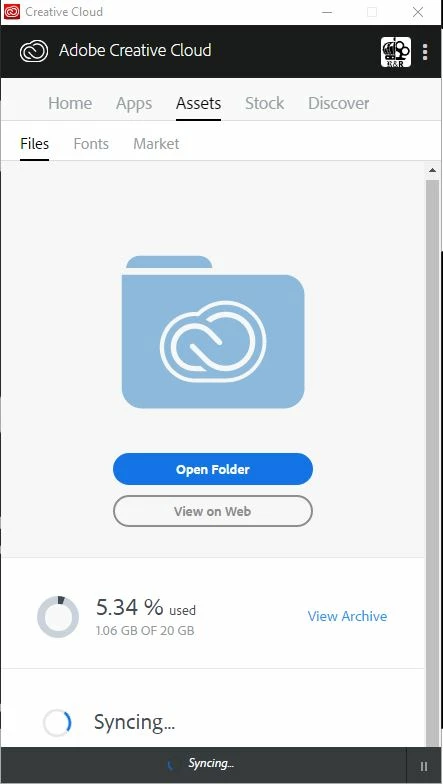
Adobe CC has been syncing for days just to add a muse widget restarting does nothing.

(EDIT: I installed it using extension manager but it is still syncing...)

So I have some Muse widgets from the adobe add-ons site (should have known better that site is mostly trash) but it (of course) is not showing up in muse.

I go to make sure my Sync settings are all good, they are but my widget is still not there. So I restart both my PC and CC and it starts syncing. Great! However it has now been "syncing" for 2 days and still hasn't stopped (or started I cannot tell.) All my files are synced (I only have 1.06 GB used) but still no widget, libraries seem to be synced up just fine too...

Know what is up or how to fix it?

This is one of the add-ons
https://exchange.adobe.com/addons/products/7812#.WctSMWhSz-g


This is what it looks like
Correct answer Ramesh_Encore

Hi,

Sorry for the issue you are facing with the sync process. Meanwhile I try to reproduce the issue from my side, could you please share the log files collected using Log Collector Tool ?

Regards,

Ramesh.

2 replies

Participant
November 29, 2020

Adobe should be sorry for dreading thousands of computers and compromising work worth millions and millions of dollars worldwide. The cloud sync function is crap. It nearly killed two of my puters and several disks and if I hadn't had backups. What if everyone facing these problems sued Adobe?


Ole Marius Kristensen
Kristensens Form

Ramesh_EncoreCorrect answer
Adobe Employee
September 27, 2017

Hi,

Sorry for the issue you are facing with the sync process. Meanwhile I try to reproduce the issue from my side, could you please share the log files collected using Log Collector Tool ?

Regards,

Ramesh.

Inspiring
April 18, 2018

Was there resolution here?

I have a similar/same issue where my CC is not completing syncing and I cannot share files or 'view on web'

tried pausing, tried quitting app and restarting. no effect.

Known Participant
June 4, 2018

About to delete this and I am assuming you fixed it but for anyone else the only solution I found after tons of issues was to do a fresh install on a fresh version of windows.