
andym48918110
Participant
June 14, 2018
Answered

CC Sync won't update on second machine

  • June 14, 2018
  • 2 replies
  • 421 views

I have CC installed on two computers (one at work and the other at home for those awesome work-from-home days)  and discovered about a week ago that the CC directory isn't updating on my second machine. I thought it might be a cloud storage issue, so I tried clearing out projects that aren't being worked on anymore as well as removing the "deleted" CC files on the web page but still no luck. I also tried changing my CC directory but only one directory managed to download and all of the directories contained within were empty.


I've seen that I'm not the only one with this issue...has there been any solutions? I've read that uninstalling would help?
This topic has been closed for replies.
Correct answer David__B

Hi Andy,

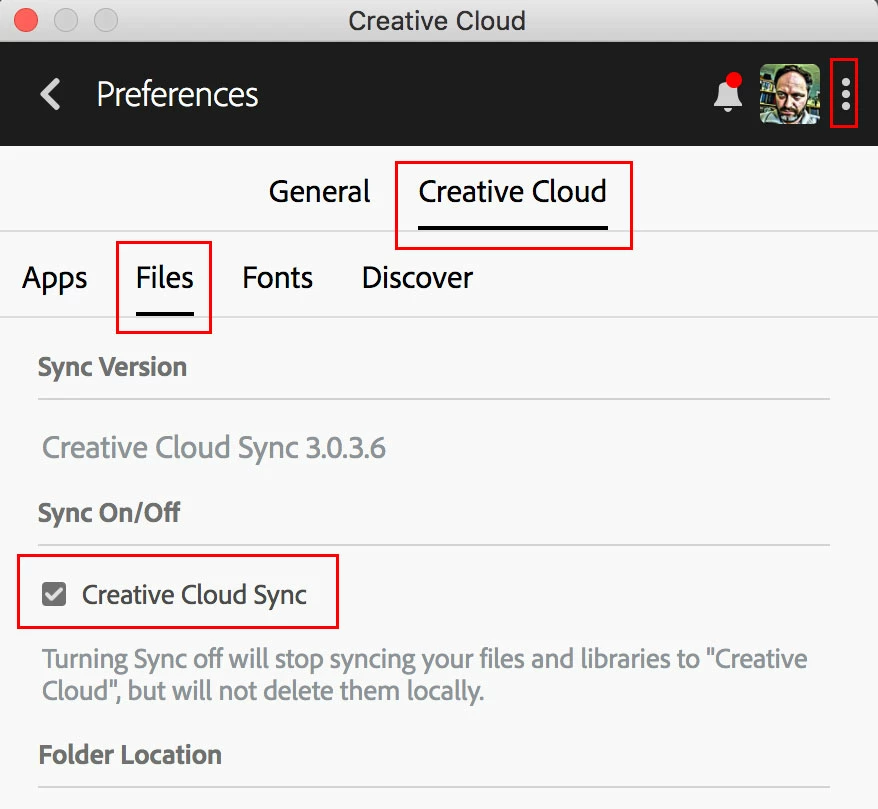
I wondered if the cause might be the syncing somehow just accidentally got turned off on the computer with the empty Creative Cloud Files folder. I'd want to check if that might be the cause by conforming it's turned on from the Creative Cloud app preferences.

Maybe try that first and see if it helps.

Best,

- Dave

2 replies

David__B
Adobe Employee
David__BCorrect answer
Adobe Employee
June 15, 2018

Hi Andy,

I wondered if the cause might be the syncing somehow just accidentally got turned off on the computer with the empty Creative Cloud Files folder. I'd want to check if that might be the cause by conforming it's turned on from the Creative Cloud app preferences.

Maybe try that first and see if it helps.

Best,

- Dave

kglad
Community Expert
Community Expert
June 15, 2018