


Inspiring
Apr 11, 2017 3:08 AM UTC
Answered

CEPHtmlEngine.exe process causing Illustrator performance issues

Hi David,

I am happy to report that with the latest update to the Creative Cloud App my problem of perpetual cloud syncs has been fixed. Everything is now working normally. I am truly happy that the engineers addressed the problem and where able to fix it.

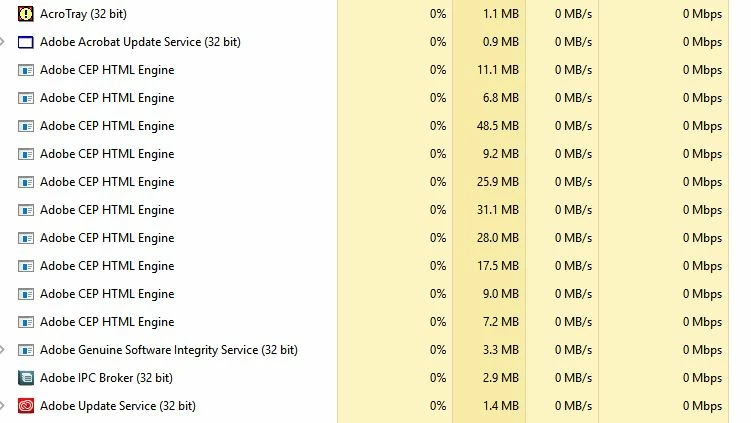
As to your question, my problem with Illustrator is that certain background processes (it seems it is CEPHtmlEngine.exe) is loading multiple times in the background causing a CPU overload (loading 20 times or more). The issue has been around now for over a year. It is known to Adobe and a fix has been promised, but I am still having the issue. The issue is so bad, I can only use Illustrator for a short time until it becomes unusable and needs to be terminated. Again, it’s all that cloud stuff which I really don’t need. I need to be able to work locally on my machine and reliably so.

The thread dealing with the issue is here: What is the "Adobe CEP HTML Engine"? It`s using too much from my processor. There are many threads pertaining to just that issue, and obviously it still has not be adressed proberly in any of the many updates. At least any fixes dont work for me...

Should I post the issue in the Illustrator forum?

Thanks to the team for getting my syncing issue fixed!!

Cheers, Walter
This topic is closed to new replies. Start a new post to keep the conversation going.
Red PointCorrect answer
Inspiring
Apr 11, 2017 3:27 AM UTC

https://forums.adobe.com/message/8908608#access_token=eyJ4NXUiOiJpbXNfbmExLWtleS0xLmNlciIsImFsZyI6IlJTMjU2In0.eyJmZyI6Il…

Another forum thread, with the same issue. I have tried all the fixes but to no avail. I will now attempt to delete the CEPHTML Engine Exe file in Illustrator.

15 replies

ChristianEngemand
Participant
Aug 9, 2019 10:44 AM UTC

This is still a big issue...

Indesign.. Illustrator.. Photoshop... these are programs i use that all does this.. could someone from the adobe team please adress this..

Translate
obedo83002110
Participant
Sep 17, 2019 4:38 PM UTC
Same here. Huge problem. Multiple Adobe CEP HTML Engine processes in multiple Adobe software. Indiesign Illustrator PhotoShop.
Translate
Participant
Dec 13, 2019 4:40 PM UTC

Same issue here. 

Translate
Red PointAuthor
Inspiring
Mar 3, 2019 5:39 PM UTC

The initial procedure to fix this issue does not work, because ALL the links referred to in the support document do not apply to Illustrator 2019.

See: High CPU usage due to CEPHtmlEngine

Please send us an updated procedure which will work in Illustrator 2019.

Thanks, Walter

Translate
Participating Frequently
Jul 21, 2019 5:21 PM UTC

J'ai le même problème. Incroyable il n'y a pas fixe sur 2019 ... ce qu'ils font?

Translate
Red PointAuthor
Inspiring
Mar 3, 2019 5:30 PM UTC

Here is a screenshot:

Translate
Red PointAuthorCorrect answer
Inspiring
Apr 11, 2017 3:27 AM UTC

https://forums.adobe.com/message/8908608#access_token=eyJ4NXUiOiJpbXNfbmExLWtleS0xLmNlciIsImFsZyI6IlJTMjU2In0.eyJmZyI6Il…

Another forum thread, with the same issue. I have tried all the fixes but to no avail. I will now attempt to delete the CEPHTML Engine Exe file in Illustrator.

Translate
Red PointAuthor
Inspiring
Apr 11, 2017 3:31 AM UTC

Preran (Adobe Staff) said Feb 25 2016 that the issue would be fixed (solutions he mentioned did not work for me). :

Cheers,

Walter

Translate
Red PointAuthor
Inspiring
Apr 11, 2017 3:45 AM UTC

I can confirm that deleting CEPHtmlEngine.exe (I just renamed it) in Illustrator fixed the problem for me. Since I renamed the file, I get two error messages on startup but everything else works flawlessly now. Seems CPU load is back to normal. This issue needs to be addressed by Adobe at some point though, its been over a year now since the issue first got pointed out.

I am sure Adobe will get it fixed. If you need logs I will be happy to supply.

Cheers, Walter

Translate