
November 13, 2020
Answered

Cloud Space full even though it's empty?

  • November 13, 2020
  • 1 reply
  • 467 views

Hello!
So me (and others in my university) have the issue that Adobe keeps telling my the Cloud is full. I deleted EVERYTHING.
There is absolutely nothing I can find on there, even in the delted folder I cleared everything.

Yet it says 35.8 GB out of 2 GB are used. 

I really don't know what else to do at this point. I noticed the "used" GB keeps going up, but again, everything is empty.
(I can take screenshots from everything, If needed.)


Has anyone any idea how I can fix this?

Thank you in advance!
This topic has been closed for replies.
Correct answer kglad

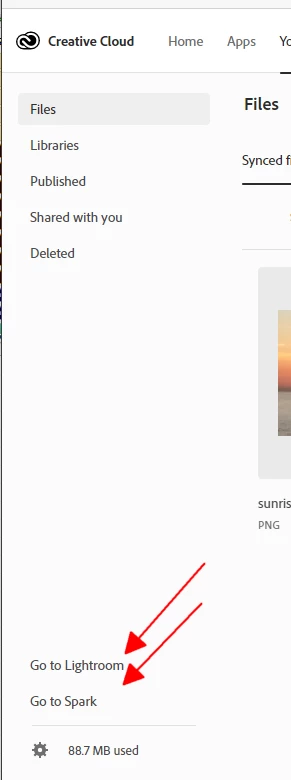
go to your cc web and check lightroom and spark files:


1 reply

kglad
Community Expert
kgladCommunity ExpertCorrect answer
Community Expert
November 13, 2020

go to your cc web and check lightroom and spark files:


November 13, 2020

That was it, it was Lightroom, thank you so much!
I didn't even know Lightroom did it like this, and not in the normal Cloud. 

kglad
Community Expert
Community Expert
November 13, 2020

you're welcome.


p.s. i didn't know this either until i saw what you saw on my personal account a few months ago and tracked down the issue.